Make online booking easy for your customers
Customers choose an available time slot themselves, put together their group, and fill in the necessary information. You’ll receive a complete request that your team can act on right away.
Receive a complete application right away
An email request rarely includes all the information you need right away. The customer may suggest a date, but might not specify what time they want to start, how many groups are needed, or what language the tour should be conducted in.
After that, you'll need to wait for several more messages before you can properly review the request.
In Eguide, customers navigate through the various options on their own. They select a tour or activity and, thanks to the schedule and capacity you’ve set, see only the dates and times that you actually offer.
He then fills in the group assignments, contact information, and any special requests. That way, your team won’t receive a random question, but a request they can act on right away.
Let customers put together their own group
Not every booking consists of a single group. For example, an organization might request a guided tour for sixty participants, divided among different languages.
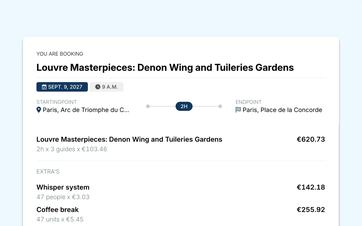
The customer can add multiple groups within the same request. For each group, the customer specifies the number of participants and the preferred language. Any available extras and practical comments can also be added right away.
As the customer adjusts their selections, the total is recalculated. This way, they can see before submitting their order how the selected group configuration and extras affect the price.
You determine which price to use in advance by setting the appropriate pricing formula, seasonal prices, and extras.
Have the customer check everything one more time
Before the request is submitted, the customer receives a clear overview of their options. The date, time, groups, languages, extras, and contact information are all listed there.
If anything needs to be changed, he can go back to a previous step without having to start over.
This reduces the risk of missing or incorrectly transcribed information and saves your team from having to do unnecessary correction work.
See how your customers book online
We'll walk you through the booking process using an activity from your own lineup.
Let online payment determine how the application is submitted
For private tours, the outcome of the online process is linked to online payment.
If online payment is enabled, the customer completes the payment through Mollie, and Eguide creates a booking with the status "Pending Validation."
If online payment is disabled, the online request will be submitted as a proposal. Your team can review and follow up on the proposal before it becomes a booking.
So there is no separate setting that allows you to choose between a booking request and a proposal for each tour, independent of the online payment process.
Stay in control of every request
Submitting an application online does not automatically mean it has been definitively confirmed.
With online payment, a booking with the status "Pending Validation" is created upon completion. Your team then checks whether the booking can be fulfilled and validates it.
Without an online payment, the request is initially submitted as a proposal. Once the customer accepts a proposal, it is converted into a booking that still needs to be validated.
This allows customers to submit the necessary information on their own, while your organization retains operational control.
Let customers get started from your website or campaign
You can access the online booking process from your own website, a campaign page, or a link that you share directly with a customer.
All requests are routed to the same Eguide environment. This means your team doesn't have to keep track of separate forms, mailboxes, or systems.
Depending on your website, you can use a direct booking link or a built-in widget.
Frequently Asked Questions About Online Bookings
Practical answers about booking online.
The customer selects a date and start time and provides the number of groups, the number of participants, and the preferred language for each group.
Depending on the tour or activity, he can also enter additional information, special requests, contact information, and billing information. Before submitting, he will see a summary of all the selections he has made.
Yes. When booking online, the customer can Add multiple groups and enter the number of participants and the preferred language for each group.
All groups remain part of the same booking. The limits set for group size, number of groups, and total capacity remain in effect, after which your team can assign a suitable guide to each group.
Yes. For each tour or activity, you can decide whether an online request is treated directly as a booking request or first as a proposal.
A proposal can be accepted, rejected, or automatically expire. Upon acceptance, a booking is created with the status To be validated. Payment and booking confirmation remain separate steps.
Yes, when online payment for the tour or activity has been activated.
The customer pays via Mollie. The customer selects and uses their payment method within Mollie's secure payment environment, after which Eguide receives the payment status.
No. An online booking request for a private tour is created with the status To be validated. This also applies if the customer has already paid online.
A staff member will then review the booking before it is validated. Payment and guide assignment are tracked separately and do not automatically finalize the booking. The final booking confirmation will be sent after manual validation.
Can't find your question here? Please contact us. We'd be happy to see how online booking fits into your operations.