Decide for yourself when and how many customers can make reservations
Set your regular days and hours, add exceptions, and specify how many groups can book per time slot. You set the limits for group size and participants during the tour itself.
Let customers choose only from the time slots you offer
A private tour may be available every week, but that doesn't mean it's available at any time of day. Perhaps you offer them Monday through Saturday, only in the morning, or exclusively during a certain time of year.
In Eguide, you set these standard availability options once. You determine when the tour or activity becomes bookable, on which weekdays it takes place, and between what hours customers can start.
This means you don't have to specify for each date individually when it can take place. The fixed weekly schedule serves as the basis and is automatically applied within the selected period.
Availability is tied to the tour or activity you set up earlier. This ensures that the practical details and bookable times remain the same for that offering.
Add exceptions without changing your weekly schedule
Your regular schedule doesn't stay the same all year round. During vacation periods, you might offer additional time slots, while on holidays or during events, you might be slightly less available.
In addition to your regular weekly schedule, you can therefore add individual events. You can do this for a single specific date, or for a longer period with your own days and times.
Is a tour temporarily unavailable? In that case, you can close it for a full day, a range of dates, or just certain hours. You don't need to delete your regular schedule and rebuild it later.
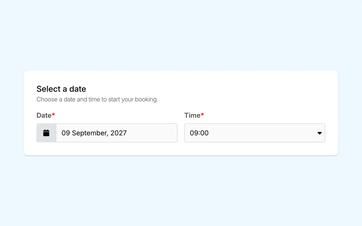
Customers will see these changes when they select an available date and a suitable time. Times when the business is closed can no longer be selected through the online booking process.
See how your schedule becomes bookable
You can see how fixed hours, exceptions, and capacity together determine what customers can choose online.
Determine how many bookings can fit within a time block
An available time slot does not necessarily indicate how many groups you can accommodate at once. Therefore, for each time slot, you can set the maximum number of groups allowed to book.
If, for example, you can accommodate three groups at the same start time, set that time slot to a maximum of three groups.
You set the limits on the number of participants and the group size separately for each tour. There is no separate participant limit per time slot.
If you leave the maximum number of groups blank, that does not mean the number is unlimited. In that case, only one online booking can occupy the time slot. As soon as that booking is made, the time slot will be closed to new online requests.
If a booking consists of multiple groups, you can assign each group separately and specify the appropriate language and guide.
Also keep in mind requests that haven't been confirmed yet
A time slot may already be partially booked before a reservation is finalized. An online request may still need to be reviewed, or a customer may have received a proposal to which they have not yet responded.
Eguide is holding that space for you. That way, the same capacity won't be offered to another customer in the meantime.
Proposals are also counted as soon as they are created. If an application is canceled, definitively rejected, or a proposal expires, the reserved capacity becomes available again.
This gives your team a more realistic picture of what can still be accepted. You don't have to rely solely on confirmed bookings and then realize afterward that several pending requests were actually intended for the same time slot.
Keep the flexibility to take action on your own
Sometimes you may decide to manually add a booking to a fully booked time slot. An authorized employee can do this after Eguide displays a warning.
That exception does not change the set capacity. For customers, the time slot remains closed once the online limit is reached.
This way, your team retains the flexibility to make its own decisions in exceptional situations, without the moment becoming available online again afterward.
Frequently Asked Questions About Availability and Capacity
Practical answers about your schedule.
Yes. You decide the time period for which the schedule applies, on which weekdays the tour or activity is available, and between what times customers can start.
For example, you can set it up so that private tours can be booked from April through October, every Tuesday through Saturday, between 10:00 a.m. and 4:00 p.m.
Yes. You can add a time block with its own start and end times for a specific date. You can also set a custom schedule to repeat on selected weekdays within a specific time period.
Yes. You can close for an entire day, block out a longer period, or mark only certain hours as unavailable. Your regular weekly schedule will remain unchanged.
Yes. For each time slot, you can set a maximum for the number of groups, the number of participants, or both.
Once one of the set limits is reached, no additional capacity will be available online.
It's not just confirmed bookings that take up capacity. Online requests that still need to be reviewed and proposals to which the customer can still respond, save a spot for us.
In the event of a cancellation, a definitive rejection, or an expired proposal, that capacity becomes available again.
Yes. After receiving a warning, an authorized employee can add or move a reservation to a time slot for which the set capacity has already been reached.
This exception does not increase capacity. The venue remains fully booked for customers.
No. The public availability of a private tour takes into account the set dates, times, and capacity, but does not automatically check whether a appropriate guide available is.
The choice of guide and final operational check remain part of your planning.
For a private tour, a time slot can be limited based on the number of groups, the number of participants, or both.
An event has set start times and a limited number of spots or tickets available. For such activities, you can Schedule fixed time slots and manage ticket capacity for each time slot.
Can't find your question here? Please contact us. We'd be happy to help you set up your availability and capacity within your organization.