Compare guides based on the assignment you need to complete
For each group, review which active guides are a good fit for the assignment, both in terms of content and practical considerations. Eguide compiles the relevant information, while your team decides for itself who to contact.
Start with the group that still needs guidance
A list of all the guides doesn't immediately tell you who to contact for a specific assignment.
You need to know which tour it is, what language the group prefers, where the activity takes place, and when it is scheduled. Only then do the details in a guide's profile make sense.
In Eguide, you open the guide matching feature from a group that hasn't been assigned a guide yet. The tour, language, and booking date therefore immediately provide the context for your selection.
When booking for multiple groups, search for each group separately. This way, each group can have its own language, number of participants, and guide without splitting the booking.
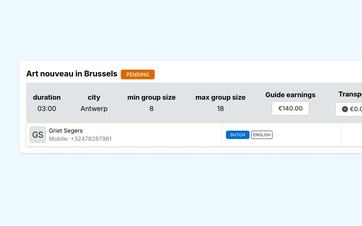
Compare information that could make a difference for this assignment
Dispatch can view relevant profile and scheduling information for each candidate.
These include, among other things, the associated guided tour, requested language, city or service area, specified availability, contract context, and preferences for specific target groups.
Previous approvals can also provide additional context. They show how previous applications were handled, but do not constitute an automatic evaluation of the guide.
This way, an employee doesn't have to open each profile individually and compare all the information on their own.
Use tour knowledge as a guide, not as absolute truth
The tours and languages listed for each guide help you compare candidates more quickly.
You can manage that information through the qualifications overview, where you record each guide’s tour knowledge and languages.
However, there may be relevant knowledge that has not yet been fully incorporated into the profile. For example, a guide may have recently completed a training program or may be able to step in on an exceptional basis for an assignment that has not yet been linked to the profile.
That is why dispatch remains free to select such a guide as well.
Record an internal rating for each tour
For each guide and tour, you can manually enter a rating of one to five stars. That score is not automatically calculated based on acceptances or rejections.
See how Dispatch compares candidates
Together, we're looking for a guide for a specific group and language.
Treat availability as information, not as confirmation
A guide can keep track of fixed work hours, exceptions, and times when they are unavailable in their personal account.
During the matching process, this information helps determine who is likely to be available on the selected date. You can read more about how this is managed in the section on guides’ availability and personal calendars.
However, availability does not mean that the guide has already accepted the booking. The guide must still receive and accept the specific request.
Conversely, a recorded unavailability does not constitute an absolute technical barrier. Dispatch can still select the guide if there is additional information or a practical arrangement that is not listed in the calendar.
See if a guide already has another assignment that day
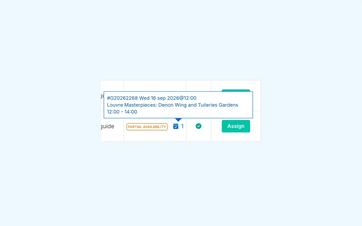
If a guide is already assigned to another assignment on the same day, Eguide displays a warning with additional explanation.
This warning helps you identify potential overlaps or an unfeasible rescheduling before you submit a request.
It does not automatically block the selection. Two assignments on the same day can sometimes be perfectly combinable, depending on the times and locations.
The final decision therefore rests with the employee who is familiar with the schedule.
Treat matching and assignment as two separate steps
Selecting a guide does not mean that the assignment has been finalized.
During the matching process, the dispatch team decides which guide to contact. The specific assignment is then offered to that guide. Only when the guide accepts does the assignment receive the corresponding "confirmed" status.
You can submit the request, follow up on the response, and contact another guide if your request is denied.
That distinction prevents a potential candidate from being considered assigned too early.
Take human knowledge into account
Not every good choice can be derived entirely from profile fields.
A planner may know that a guide is good with a specific target audience, can easily combine two locations, or has recently gained new experience.
Eguide compiles the available information, but does not automatically rank candidates from best to worst and does not independently assign anyone.
In this way, the system supports decision-making without replacing your team's knowledge and responsibility.
Check the options within the rest of your schedule
The matching view is helpful for a specific group. For a broader overview of the coming days and weeks, use the calendar with scheduled bookings.
There you can see when the various bookings take place. From the specific booking, you then proceed to the group and guide matching.
In this way, general planning, candidate comparison, and final assignment remain interconnected without being merged into a single opaque step.
Frequently Asked Questions About Guide Matching
Practical answers about comparing guides.
Dispatch can take into account, among other things, tour experience, language skills, and area of operation, specified availability, taking into account the contract context, target audience preferences, and previous acceptances.
A warning about another assignment on the same day may also be displayed.
No. Eguide displays relevant information, such as languages, tour knowledge, area of expertise, availability, and current assignments, but it does not automatically sort or select guides.
Dispatch decides which active guide is best suited for the assignment.
Ja. De kwalificatiegegevens vormen geen harde technische blokkade.
Dispatch kan in principe iedere actieve gids selecteren wanneer de situatie daar volgens het team om vraagt.
No. Availability is information that the guide has kept track of himself.
The specific assignment must still be offered separately and accepted by the guide.
No. Eguide displays an informational warning when a guide already has another assignment that day. Dispatch can still select the guide if the team determines that the assignments can be combined.
No. The selection determines who you want to send the request to.
The assignment is not confirmed until the guide has accepted the specific assignment.
Can't find your question here? Please contact us. We'd be happy to help you compare and select guides for your bookings.