Find out which tours and languages suit each guide
For each guide, keep track of which tours, languages, and areas of expertise match their profile. This way, the dispatch team can base each new assignment on shared and up-to-date information.
Make tour information visible to the entire team
In a small team, people often know off the top of their heads which guide is familiar with a particular city walking tour or in which language someone can lead a tour.
That becomes less practical as soon as you start working with more guides, languages, and locations. The information may then be stored in a spreadsheet, in old emails, or only in the memories of a few planners.
In Eguide, you enter the relevant tour information in the guide's profile. This allows any authorized employee to access the same information when a new assignment needs to be filled.
The profile remains the central starting point for the guide. You manage general contact information and history through the guide database, where each guide has their own profile.
Assign a guide to the tours they can lead
For each guide, you specify which tours match their profile. For example, this allows the dispatch team to see that someone is familiar with a historical city walk in Antwerp but hasn’t yet been assigned to a new culinary tour.
You don't need to create a completely new guide profile for that. When someone is trained to lead an additional tour, simply add that information to their existing profile.
If a tour is no longer relevant, you can remove the link again. The rest of the profile information and previous booking history will be retained.
Record languages in the appropriate context
A tour guide may be fluent in a language without being able to lead every tour in that language.
That is why language is not treated merely as a general profile characteristic. You can also link it to the tour to which it applies.
For example, a guide might lead a city walking tour in Dutch and English, while a specialized museum tour is currently linked to the profile only in Dutch.
The available language versions are drawn from the languages you manage centrally for your organization and offerings.
Learn how to manage tour information for each guide
Together, we're compiling the list of qualifications for a single guide.
Keep your qualifications up to date as your knowledge grows
Tour knowledge isn't set in stone. A guide may undergo training, start working in a new city, or learn to lead an existing tour in an additional language.
You'll simply update the relevant qualifications. There's no need to rebuild the profile, and your previous assignments will remain visible.
This way, the guide database can grow along with the knowledge within your network.
See also which offers have not yet been linked to the guide
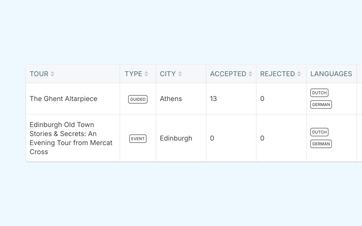
In the personal qualification overview, a guide can see which tours have already been assigned to their profile and which have not.
This makes it easier to discuss any training questions or missing links. The guide can also see which languages have been registered for each tour.
Historical data on the number of accepted and rejected applications can also provide additional context. These figures show how previous applications were handled, but do not constitute an automatic evaluation of the guide.
The qualification overview is available in the personal dashboard where guides can also view their assignments and profile.
Record an internal rating for each tour
For each guide and tour, you can manually enter a rating of one to five stars. That score is not automatically calculated based on acceptances or rejections.
Use qualifications to support planning
When the dispatch department is looking for a guide for a specific group, the types of tours, languages, and areas of expertise provide useful guidance.
This allows you to more quickly compare candidates who appear to be a good fit for the assignment in terms of qualifications. From the matching view for a specific group, this information is used in conjunction with other operational context.
However, qualifications alone do not determine the decision. Availability, prior commitments, or skills not yet fully listed in the profile may also be important factors.
Leave room for a deliberate exception
Eguide does not automatically block an active guide simply because a specific tour or language is not linked to the profile.
Dispatch can still select the guide if there is a valid operational reason to do so. Therefore, the responsibility for that decision remains with your team.
Furthermore, even after the selection process, the booking has not yet been definitively assigned. The guide must first accept the request. You can submit the request, follow up on the response, and, if it is declined, choose another guide.
Thus, profile information, human selection, and final acceptance remain three distinct steps.
Frequently Asked Questions About Languages and Tour Knowledge
Practical answers about guide qualifications.
For each guide, you can specify which tours, languages, and areas of expertise match their profile.
This information helps your team with planning and remains linked to the existing guide profile.
Yes. For a guided tour, you can assign multiple languages to the guide's profile.
This makes it clear in which languages the guide can lead that specific tour.
Yes. You can adjust the assigned tours and languages whenever a guide's expertise or availability changes.
The rest of your profile information and previous bookings will remain unchanged.
Yes. In the Guide Portal The guide can view the assigned and unassigned tours, along with the registered languages.
This overview can be used, for example, to discuss new training opportunities or missing links.
No. Eguide displays relevant information, such as languages, tour knowledge, area of expertise, availability, and current assignments, but it does not automatically sort or select guides.
Dispatch decides which active guide is best suited for the assignment.
Ja. De kwalificatiegegevens vormen geen harde technische blokkade.
Dispatch kan in principe iedere actieve gids selecteren wanneer de situatie daar volgens het team om vraagt.
Can't find your question here? Please contact us. We'd be happy to help you figure out how to manage language skills and tour knowledge within your guide database.