Software for tickets, activities, and group visits
Sell tickets for specific time slots and manage group visits, activities, and tour guides all from the same platform.
Not every visit starts the same way
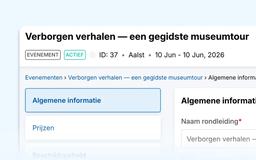
From individual tickets to school groups
An individual visitor buys a ticket for a specific time slot. A family books an activity. A school requests a program for multiple groups.
When tickets, group requests, and tour guides are tracked in different systems, it’s easy to lose track of the big picture.
Eguide brings together ticket sales, activities, and group visits. You can choose to use only the features that fit your offerings.
What You Get with eguide
Sell tickets, manage group visits, and schedule tour guides all from the same platform.
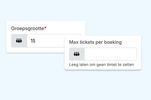
Tickets by Time Slot
Determine how many tickets are available and let visitors make reservations for free or pay online.

Groups arranged separately
Organize school and group visits with your own group sizes, languages, questions, and practical arrangements.
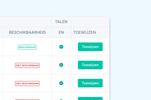
Guides as needed
Assign one tour guide per group or activity. Sell unguided tours without a guide.








From Buying Tickets to Visiting
For different types of visitors
Use tickets for scheduled visit times, group bookings for schools and clubs, and tour guides when guidance is needed.
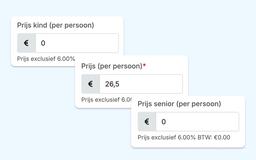
Rates for Different Types of Visitors
Not every visitor pays the same amount. For ticketed events, for example, you can set separate rates for children and seniors.
Extras can also be added separately, each with its own price and VAT rate. This allows you to structure your offerings exactly as visitors actually book them, without having to bundle everything into a single standard ticket.

School and Group Visits
School groups, clubs, and companies often take a different route than individual visitors.
Request the necessary information for each program and register multiple groups within a single booking. Each group can have its own number of participants, language, and tour guide. A private group tour will be reviewed by your team before it is definitively confirmed.
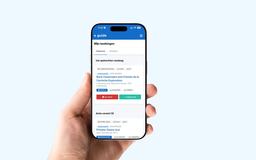
Allow the guides to respond themselves
Guides manage their regular work hours, exceptions, and absences in the Guide Portal. They receive assignments, can accept or decline them, and view practical information there.
The planner remains responsible for the selection and decides which tour guide will be assigned to a tour.
Frequently Asked Questions from Museums and Heritage Sites
Practical information about tickets, group visits, and tour guides.
Eguide supports tickets for activities and tour times with fixed times and capacity.
Whether Eguide can replace your entire ticketing system depends on how your current system operates. Box office sales, subscriptions, physical access control, and ticket scanning are not confirmed features of Eguide.
During a demo, we’ll therefore explore which ticketing solutions are compatible with Eguide and which existing systems will still be needed alongside it.
Yes. For a free event, the customer reserves a spot. For a paid event, the customer purchases tickets and completes the Pay via Mollie.
In both cases, the capacity is updated as soon as registration is complete.
Ticket-related activities can be done with different rates be set up. Eguide supports, among other things, separate rates for children and seniors.
The available rates and terms are set on a per-activity basis.
No. An event can be organized entirely without a guide.
In contrast, for a guided private tour, guides are assigned to each group. For activities that do require a guide, you can use Eguide to Schedule a suitable guide.
Yes. Eguide supports both sales models within the same environment.
A private tour Consists of a single booking with one or more groups. Each group has its own number of participants, language, and guide.
A event works with Fixed time slots and available ticket capacity. A guide may be used for this purpose, but is not required.
Your team monitors both sales streams centrally. For the Eguide usage fee, private bookings and tickets sold are billed according to their respective rates.
No. Eguide displays relevant information, such as languages, tour knowledge, area of expertise, availability, and current assignments, but it does not automatically sort or select guides.
Dispatch decides which active guide is best suited for the assignment.
A direct connection to an existing point-of-sale system is not included as standard.
Eguide can be used alongside other systems, but the exact division of responsibilities between ticket sales, the box office, and admission must be determined on a case-by-case basis for each organization.
A comprehensive solution for QR scanning, access gates, or specialized check-in is currently in the pipeline. The strongest connection lies in online bookings, tickets, participants, groups, and any guide scheduling.
Combine tickets and visits
See how Eguide fits with your tickets, activities, and groups.