Sell your tickets without losing track of them
Let customers reserve a spot or buy tickets online. Eguide tracks remaining capacity and brings all participants together at the right time for the event.
Open ticket sales as soon as your event is ready
Once the date, time, and capacity of an event have been set, you can let customers order tickets. They choose the event time they want and indicate how many people will be attending.
You decide whether it's a paid event or a free activity for which customers simply reserve a spot. In either case, each registration is linked to the correct event time.
Ticket sales are thus directly linked to the dates and times you've scheduled for the event. You don't have to track sales and practical planning in separate systems.
Show customers right away what's still available
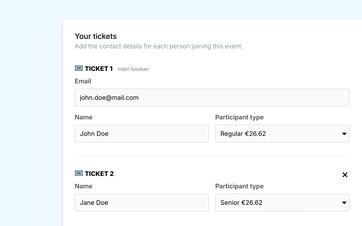
Eguide keeps track of how many tickets have already been sold or reserved. This ensures that customers can never select more seats than are available for the event.
You can also limit the number of tickets a single customer can purchase in a single order. This prevents a single large order from taking up all the seats at once.
If you use different prices for adults, children, or seniors, customers will see the available options during the ordering process. You set these amounts in advance when you determine the ticket prices and any seasonal prices.
Free and paid events have the same capacity
For a free event, the customer confirms their registration without making a payment. For a paid event, they are redirected to Mollie to complete the payment.
If the payment fails or the customer cancels the order, no tickets will be sold and no incomplete order will remain. This means the seats will not be unnecessarily reserved.
See how ticket sales and attendee management come together
We'll demonstrate this using an event from your own lineup.
Keep all participants together at the right moment during the event
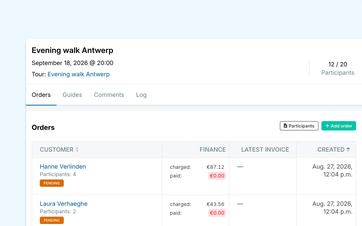
For each event date, you can see how many people have registered and how many spots are still available. This way, you’ll know not only how many tickets have been sold, but also who you can expect on that date.
What if a registration isn't submitted through the website? An authorized staff member can add a participant manually. This is useful, for example, for phone requests, in-person registrations at the front desk, or participants referred by a partner.
If someone needs to be moved to a different time slot, you should remove the participant from the original event and add them to the new time slot. Eguide will then check again to see if there is still enough space available.
Reach the entire group of participants through the same event
Do you need to share a practical detail, such as a change in the meeting location or additional information before departure? From within the event, you can send a single message to all participants.
Sent communications are logged. This allows your team to see later what information was shared, and eliminates the need to maintain a separate distribution list. This history is linked to the notes and communications you keep in your files.
Provide the guide with the information needed on site
When a guide is assigned to the event, they can view the participants' names. Attendance can be recorded during the event, so it remains clear afterward who actually participated.
This ensures a seamless transition from ticket sales to recording performance and attendance, without having to re-enter participant lists.
Frequently Asked Questions About Tickets and Participants
Practical answers about ticket sales.
Yes. For a free event, the customer reserves a spot. For a paid event, the customer purchases tickets and completes the Pay via Mollie.
In both cases, the capacity is updated as soon as registration is complete.
Yes. In addition to the event's total capacity, you can also set the maximum number of tickets a single customer can purchase in a single order.
This way, you can keep more spots available for other visitors without reducing the event's total capacity.
If the payment fails or is interrupted, no order will be saved and no tickets will be sold.
The customer receives a notification about the failed payment, and the seats remain available for a new order.
Yes. An authorized staff member can manually add a participant to an event session.
To reschedule someone, remove their registration for the original time slot and register the participant for the new time slot. The capacity of the new event time slot remains in effect.
Yes. Authorized staff members can send a single message from an event to the entire group of registered participants. The message sent can be retrieved within the relevant context.
Can't find your question here? Please contact us. We'd be happy to explore how ticket sales and participant management can fit into your organization.