Direct customers from your website straight to the right booking
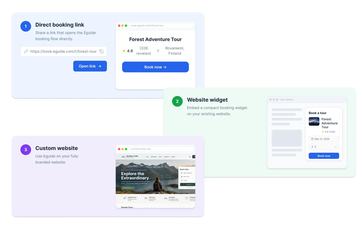
Use a direct link to a tour or event. With a fully integrated Eguide website, you can also display bookable options directly on the page.
Direct visitors straight to the right booking
A visitor who has already selected a tour or event on your website doesn't need to search through your entire selection again.
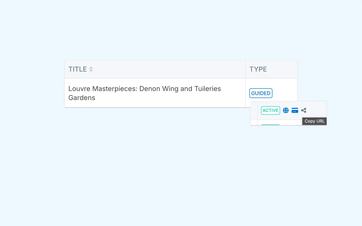
With a direct booking link, you can send them straight to the right activity in Eguide. You can use a link like this behind a button on your website, in a campaign, in an email, or on a partner page.
The customer is directed to the same online booking flow where the date, groups, and customer information are collected. The configured availability, prices, and capacity therefore remain in effect.
You don't need to maintain a separate form or a second sales process alongside Eguide for that.
Display bookable options on an integrated website
Would you like visitors to be able to view dates, tours, or tickets right on the website? Within a fully integrated Eguide website, booking widgets can be embedded directly into the page itself.
For a private tour, the widget displays the available dates and times before the group booking flow opens. For events, the ticket widget displays the available times, tickets, and remaining seats.
Choose the display option that best suits your listing
A limited number of events can be displayed directly with a "Buy" button. If the number of events increases significantly, the event widget automatically switches to a calendar view to maintain a clear overview.
The fully integrated website is a separate service in addition to the Eguide platform. If you already have your own website, you can use direct links or use the Public API to build your own selection.
See which booking solution is right for your website
We're comparing direct links, widgets, and an API integration.
Make sure every route ends in the same booking flow
Whether a customer starts from a direct link, a widget, or their own selection on your website, the rest of the data entry takes place in Eguide.
There, the customer creates their groups, enters their contact and billing information, and completes the request. If online payment is enabled, the payment is then processed through Mollie.
This way, you don't have to set up a different process for each entry. The request is routed to the same environment where your team reviews and follows up on it.
Make sure to clearly distinguish between the selection and checkout processes
A website can use the Public API to display offerings, prices, and availability. Once a visitor has selected a tour, date, and time, they are redirected to Eguide via a signed link.
The Public API is therefore not a complete booking or payment environment. It supports the selection and secure transfer to the Eguide flow.
Use the simplest route you need today
You don't have to build a full website integration right away to accept online bookings. A direct link is often enough to quickly make a single tour, event, or campaign bookable.
If you want to display more products on your website later or allow visitors to filter them there, you can continue building using an integrated website or the Public API.
This allows you to select the appropriate entry point for each point of sale without having to reorganize your operational follow-up.
Frequently Asked Questions About Booking Links and Widgets
Practical answers about your website.
Yes. A direct booking link opens the selected offer, so the customer doesn't have to search through all the activities again.
The built-in booking widgets are part of the fully integrated Eguide website, which is offered as a separate service.
On another website, you can use direct links or create your own integration with the API build.
Further data entry and checkout take place in the public Eguide booking flow.
When online payment is enabled, the customer is redirected to Mollie to complete the payment.
Yes. Using the API, a third-party website can retrieve listings, prices, and availability, and then securely submit the selected tour, date, and time to the Eguide booking flow.
Can't find your question here? Please contact us. We'd be happy to help you find the booking solution that's right for your website.