Booking software for tours, groups, and guides
Bring together inquiries, group bookings, guides, and follow-up. This way, you can keep track of customized services from the initial inquiry through to completion.


There's a lot involved in making a group reservation

Everything has to come together at the same time
A customer requests three groups in two languages. The date works, but the guides haven't been confirmed yet. After that, the number of participants changes, and the price needs to be updated as well.
When that information is scattered across email inboxes, calendars, and separate lists, every change requires coordination all over again.
Eguide keeps the request, groups, guides, prices, and practical arrangements all together under the same booking. This way, your team can see what’s already been taken care of and what still needs attention.
Every booking requires consistency
Keep requests, groups, guides, and practical arrangements all together in one clear schedule.
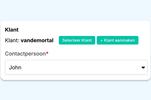
From Request to Booking
Process bookings and quote requests without having to re-enter data.

Book Now or Get a Quote First
Allow guests to book tours directly, and use a quote request for groups or custom tours that require prior coordination.

Guides: Planning and Information
Guides can share their availability, respond to assignments, and view practical information in their own Guide Portal.






From Request to Completed Tour
Changes Without Starting Over
Planning doesn't stop after the initial request. Eguide helps you process changes without having to separate groups, guides, and financial arrangements from one another.
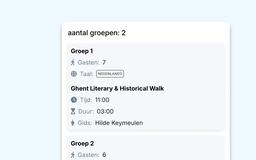
Multiple groups within a single reservation
A single customer booking can consist of several groups. For each group, you specify the number of participants, the language, and a dedicated guide.
If the number of participants or the group composition changes, Eguide will recalculate how many guides are needed and what prices and costs apply.
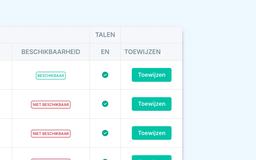
Dispatch makes the decision; the guide stays informed
Guides manage their work hours, exceptions, and absences in the Guide Portal. When planning, you can view information such as languages, locations, specified availability, and existing assignments.
Your planner uses that information to select a guide. Eguide does not make that decision on your behalf. Guides respond to their assignments themselves and receive a notification when relevant changes are made.
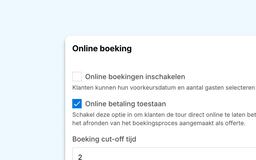
Book online through your website
The online booking process is included as standard. You can link directly to a specific tour or activity from your website.
Through the public API, a website can also display listings, availability, and prices before the visitor proceeds to the Eguide booking flow. The API is intended for this display and data transfer, not as a fully standalone checkout.
A fully integrated website is available as a separate service.
Frequently Asked Questions from Tour Operators
Practical answers about group bookings, guides, and online booking with Eguide.
Yes. Eguide supports both sales models within the same environment.
A private tour Consists of a single booking with one or more groups. Each group has its own number of participants, language, and guide.
A event works with Fixed time slots and available ticket capacity. A guide may be used for this purpose, but is not required.
Your team monitors both sales streams centrally. For the Eguide usage fee, private bookings and tickets sold are billed according to their respective rates.
Yes. All groups remain part of the same customer booking.
General customer information, the tour itinerary, and the date are shared, while each group can have its own number of participants, language, and guide.
No. Eguide displays relevant information, such as languages, tour knowledge, area of expertise, availability, and current assignments, but it does not automatically sort or select guides.
Dispatch decides which active guide is best suited for the assignment.
No. The public availability of a private tour takes into account the set dates, times, and capacity, but does not automatically check whether a appropriate guide available is.
The choice of guide and final operational check remain part of your planning.
No. An online booking request for a private tour is created with the status To be validated. This also applies if the customer has already paid online.
A staff member will then review the booking before it is validated. Payment and guide assignment are tracked separately and do not automatically finalize the booking. The final booking confirmation will be sent after manual validation.
Yes. For each tour or activity, you can decide whether an online request is treated directly as a booking request or first as a proposal.
A proposal can be accepted, rejected, or automatically expire. Upon acceptance, a booking is created with the status To be validated. Payment and booking confirmation remain separate steps.
No. Eguide was developed for organizations that manage tours, activities, group bookings, guides, and tickets.
It is not a general-purpose system for package tours, transportation, or accommodations, nor is it a full-featured channel manager for third-party sales platforms.
Find out how Eguide fits into your booking and guide scheduling processes.
Watch a demo to see how Eguide integrates bookings and guide scheduling.