Manage tours and activities on a single platform
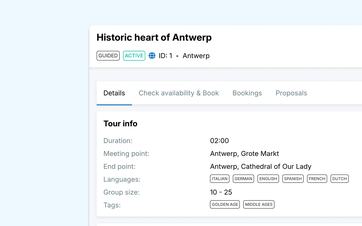
Keep all the standard details for each tour or activity in one place. When a new request comes in, your team can immediately start with the correct duration, locations, group rules, and customer information.
Always start with the correct information
For every tour or activity, the same practical questions come up:
- Where does the activity start and end?
- How long does it take?
- What is the maximum size of a group?
- What's included?
- What information do participants need in advance?
In Eguide, you store that information right with the activity itself. That way, your team doesn't have to keep searching for it in old quotes, separate documents, or emails.
Even colleagues who aren't as familiar with the business can find the right information right away. They don't have to ask first what the standard practice is or which version of a document is still current.
That way, what you offer won't depend on the memory of a single employee.
A new application? The groundwork is already in place
When a customer submits a request, you don't have to start from scratch. Just select the correct activity and fill in the details for this booking, such as:
- the date and time;
- the number of participants;
- the customer's contact information;
- any deviating agreements.
The usual duration, locations, and customer information are already entered. This saves time and reduces the chance that someone will copy outdated information from a previous booking.
Do you need to make changes to the booking later? In that case, all follow-up tasks will remain consolidated in "Manage Bookings" from a single workspace.
An exception remains an exception
Not every customer wants exactly the same tour. A group might want to start at a different location, leave earlier, or spend more time on the tour.
You'll only be adjusting the specific reservation. The fixed details of the activity will remain unchanged for all subsequent requests.
This way, you can offer customization without having to create a new activity for every variation. You also won't have to figure out later which version should be used as the default going forward.
Keep the execution close to the offer
From the tour details page, you can view the logistics, availability, prices, guides, resellers, and customer instructions for a single experience. The same page provides access to the relevant settings, a calendar showing available dates, and the bookings and proposals associated with the tour.
This makes the transition from configuration to booking management a simple one. For guided experiences, you can also specify which languages and tour knowledge a guide needs through guide qualifications.
See how your own listing is structured in Eguide
You can see how the master data is reflected in requests, bookings, and scheduling.
One application, even if you need multiple groups
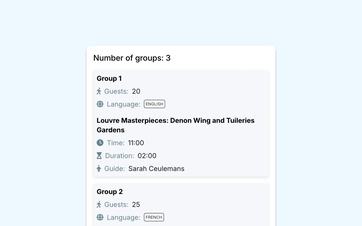
Suppose an organization books a guided tour for 45 participants. To carry out the tour, you divide them into three groups, each with a different guide or in a different language.
For the customer, this remains a single reservation. Within that reservation, you can specify the following for each group:
- how many participants are coming;
- the language in which the tour is conducted;
- which guide is leading the group.
This means you don't have to manage three separate bookings at the same time. The customer information, appointments, and changes all stay together under the same request.
If you regularly organize larger groups, you can divide participants across multiple groups, languages, and guides within a single booking.
Use the same information as you continue building
Would you like to offer a tour online at a later date? If so, you won't need to re-enter the name, duration, meeting place, and instructions for participants into another system.
You’ll build on the activity that’s already listed in Eguide. First, you’ll determine when the activity can be booked and how many spots you’ll make available. Then, you’ll set the appropriate pricing for different groups, time periods, or extras.
Once everything is set up, you can let customers request or book the activity directly online.
This way, your team uses the same information for sales, planning, and execution. If you make a change, you won't have to search for old versions in different places.
Frequently Asked Questions About Private Experiences
Practical answers about your private offer.
A private tour consists of one or more groups, each with its own guide. The customer books everything as a single package.
You can enter, among other things, the name, description, default duration, start and end locations and set the minimum and maximum group sizes.
You can also use it to store the information customers need in advance, such as what's included, what they need to bring themselves, and how they can prepare.
Yes. For a tour or activity, you can specify the languages in which it is offered.
When a booking consists of multiple groups, each group can be assigned its own language. Your team can then, for each group, assign a suitable guide.
Yes. For example, for a single booking, you can specify a different time, a different starting location, a different duration, or a different group composition.
Those changes apply only to the booking in question. The details of the tour or activity will be saved for future requests.
Yes. All groups remain part of the same customer booking.
General customer information, the tour itinerary, and the date are shared, while each group can have its own number of participants, language, and guide.
Yes. For each tour or activity, you decide how customers can book them online.
You can have a booking request submitted for each tour, request a quote first, or enable online payment—whichever fits your sales process best.
View how to let customers choose their own time slot, group size, and any extras.
No. An online booking request for a private tour is created with the status To be validated. This also applies if the customer has already paid online.
A staff member will then review the booking before it is validated. Payment and guide assignment are tracked separately and do not automatically finalize the booking. The final booking confirmation will be sent after manual validation.
An event takes place on a predetermined date and start time. Customers purchase or reserve one or more seats within the available capacity.
A private tour is booked in its entirety by a single customer or group. The date, group assignments, and other arrangements are managed within that specific booking.
Can't find your question here? Please contact us. We'd be happy to help you manage your listings in Eguide.