Record frequently used information accurately once
Store fixed starting points, categories, and target audiences in one central location. That way, everyone uses the same information, and you don't have to re-enter them for every tour or booking.
Stop entering the same locations over and over again
Many guided tours depart regularly from the same locations.
A plaza, museum entrance, train station, or visitor center appears in various activities and bookings. When employees have to write down the address and description over and over again, different versions quickly emerge.
One entry lists a street name, another lists a landmark, and a third contains outdated information.
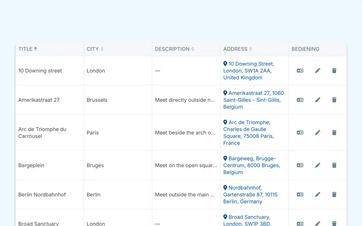
In Eguide, you save a frequently used location just once.
After that, you can reuse them as a starting point or destination. This way, your team will always start from the same name, the same address, and the same description.
Give customers and guides the same clear instructions
A meeting place must not only be appropriate internally.
Both the customer and the guide need to know where they are expected to meet. That is why the selected location remains linked to the tour and the booking.
The practical information may appear again in communications and in the guide's instructions.
This way, you reduce the chance that the customer will receive a different description than the person who will be leading the group.
Make the location easy to recognize
In addition to the address, you can add a directions description.
For example, you can specify which entrance the group is expected to use or what landmark they should look for once they arrive.
If the location was recorded correctly, it will also be easier to view it on a map.
This helps customers and guides get their bearings in advance, without requiring the dispatch team to write out directions all over again for every booking.
See how a single, solid foundation can simplify your entire operation
During a demo, we'll show how locations, listings, customers, and guides reuse the same information.
Bring structure to a growing product lineup
With just a few guided tours, you'll usually find what you're looking for quickly.
As your offerings grow, it becomes more difficult to keep city walks, themed tours, family activities, and business packages organized.
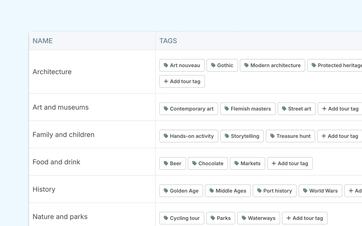
Categories and distinctive features help you group activities in a logical way.
This way, your team can find the right offer more quickly, and no one has to memorize all the tours.
You can read about how to manage the activities yourself in the section on centrally managing private tours and activities.
Use words that fit your own approach
Every organization structures its offerings differently.
Perhaps you work with themes such as heritage, architecture, and gastronomy. Or maybe you mainly distinguish between schools, families, and businesses.
You can therefore choose for yourself which categories and characteristics are useful for your organization.
This way, Eguide won't just be a collection of generic labels, but an overview that aligns with the way your team talks about the offerings.
Identify more quickly which audience an application is intended for
A school group requires a different approach than a family outing or a corporate event.
By using recognizable customer types and target audiences, it becomes clearer more quickly what kind of request your team is dealing with.
This helps employees conduct more targeted searches, ask the right questions, and suggest options that are better suited to the group.
The customer remains listed as an individual or organization. This categorization provides your team with additional context for follow-up.
You can read more about individual customers in the section on managing individual customers.
Find a guide who's a good fit for the group
Some guides enjoy working with schools. Others have more experience with families, seniors, or business groups.
Target audiences can therefore also be helpful when you're looking for a guide before booking.
Not only can you see who speaks the language and is familiar with the tour, but you also get more context about the types of groups that person likes to work with.
The final decision rests with Dispatch. To learn how to compare candidates for a specific group, see the section on finding a suitable guide.
Keep names recognizable in different languages
A location, category, or target audience can also be translated.
This allows you to continue working with the same information internally, while customers see the term in their own language where it is supported.
So you don't need to create a separate location or category just because your listing is available in multiple languages.
To learn how to manage multilingual functionality more broadly, see the section on offering a single tour in multiple languages.
Adjust your foundation as your business grows
Your services and service area don't always stay the same.
Maybe you're starting out in a new city, adding a regular meeting place, or want to organize your customers differently from now on.
You can then expand the central database and use the new information in future cases.
This way, the structure grows along with your organization, without you having to rebuild all existing tours and bookings from scratch.
During a demo, we’ll start with your own operations: which locations come up frequently, how do you currently organize your offerings, and which target audiences are important for your tour planning?
Frequently Asked Questions About Locations and Categories
Practical answers about reusing information.
Yes. You can save frequently used locations in one place and select them again later.
That way, you won't have to re-enter the address and description every time you take a tour or make a reservation.
Yes. A saved location can be reused as a starting or ending point for various activities and bookings.
The location remains a single shared base.
Yes. For supported languages, you can add translated names and descriptions.
This way, the same location remains recognizable internally, while customers can see the appropriate language version.
Yes. Your organization decides for itself which categories and attributes are useful for organizing tours and events in a clear and organized manner.
That categorization can also help with searching and filtering.
A customer type helps categorize customers or organizations in a way that makes them easily recognizable.
A target audience refers to the type of people an activity is aimed at—such as schools, families, seniors, or businesses—and can also help in choosing a guide.
Not necessarily. Whether locations, categories, and other information are made public depends on the website or data connections that have been set up for your organization.
During a demo, we can show you where the information reappears within your system.
Can't find your question here? Schedule a demo. Together, we'll review which locations, categories, and target audiences you currently track in different systems and how you can consolidate them in Eguide.