Recognize repeat customers right away
When a customer contacts you again, you can immediately see who they are, what they booked previously, and what information is already on file. This allows you to assist them more quickly without having to ask the same questions over and over.
Start with what you already know about the customer
A customer calls again to book a tour. Perhaps he booked a tour with his family last year, or maybe he organized an activity for a small group in the past.
You don't want to have to ask again how his name is spelled, which email address you can use, or in which language he prefers to be contacted.
In Eguide, you can look up the customer and build on the information you already have. This makes the conversation go faster and prevents the customer from feeling like they have to explain who they are over and over again.
This makes a difference for colleagues, too. The customer remains recognizable, no matter who handles the new request.
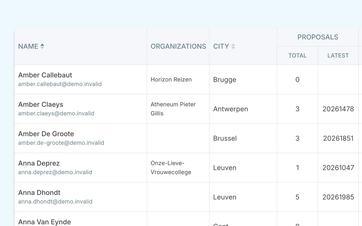
Reuse existing data
When you create a new booking, you can select an existing customer.
The information that is already available is reused. You don't need to copy it from a previous booking or ask the customer for it again.
If the customer isn't in Eguide yet, create their profile while you're finalizing the booking. You don't need to pause the request to do this.
This way, your customer base grows alongside your day-to-day operations, without customer management becoming a separate administrative task.
Avoid duplicate customers
A customer who contacts us through different channels is often created multiple times.
By searching the customer database first, your team can quickly see if the person already exists. This way, past bookings, invoices, and communications are all kept together under the same profile.
Learn how to assist returning customers more quickly
We track a single customer from their first booking to a new request.
See what the customer has booked with you in the past
When a customer refers to a previous tour, you don't have to hope that they still have the old booking reference.
From the customer profile, you can see which bookings were previously associated with that customer. You can open the relevant booking and view the date, tour, and arrangements made.
This allows an employee to quickly get the necessary context during a phone call or email exchange.
Maybe the customer wants to book the same tour again. Or maybe they're looking for something else. In either case, you'll have a better idea of where to start the conversation.
Keep individual customers and organizations separate
An individual customer books for themselves, their family, or their own group.
At a company, school, or club, multiple people may be involved in requests, scheduling, and billing. That is why organizations are provided with their own tracking system.
You can read more about this in the section on managing organizations with multiple contacts.
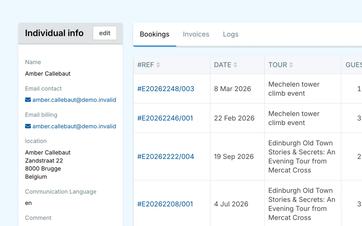
Communicate in the customer's language
A customer who was previously assisted in French does not expect to suddenly receive a confirmation in Dutch.
That is why the customer's preferred language can be saved. Automatic messages will use that language when the appropriate version of the email template is available.
This way, an employee doesn't have to check which language to use every time a booking is made.
To learn how to centrally manage languages for customers, offerings, and communication, see the section on multilingual management in Eguide.
See which messages have already been sent
When a customer says they didn't receive a confirmation, you want to be able to quickly check what has already been sent.
The customer profile shows which support emails were sent to the customer and when they were sent.
You don't have to search through a general inbox or ask various coworkers who sent the message.
You can manage the content of recurring messages using the reusable email templates in Eguide.
Also keep track of the financial follow-up
From the same customer profile, you can see which invoices are associated with the customer and whether there is any outstanding balance.
This is helpful when a customer asks questions about an invoice or when you want to know, before making a new booking, whether previous payments have been completed in full.
Invoicing itself remains a deliberate step. You can read more about this when creating advance payments and invoices from an entry.
Save history without keeping every customer active
A customer you no longer want to see in the regular selection can be marked as inactive.
Previous bookings, invoices, and communications will be retained. This way, you won't lose any history, and your active customer base will remain organized.
Frequently Asked Questions About Individual Customers
Practical answers about repeat customers.
Yes. When creating a reservation, you can search for and select an existing customer. The known information will be reused, so you don't have to re-enter it.
Yes. If the customer isn't in Eguide yet, create their profile without leaving the booking. Then continue working on the same request right away.
Yes. From the customer profile, you can see which bookings were previously linked to that person. You can open any booking to view the full context.
Yes. The linked invoices and their payment status remain visible to the customer. This way, your team can more quickly identify when further financial follow-up is needed.
Yes. Supported sent communications remains available to the customer. This allows you to quickly see whether a confirmation or other message has already been sent.
No. This feature is intended for internal customer management by your own team. A customer portal with a personal login and self-service history is not included in this.
Can't find your question here? Please contact us. We'd be happy to review how you currently follow up with returning customers.