Tailor standard system emails to your organization
Customize the standard Eguide emails to match your own tone of voice. You can edit the subject line and content for each language within the existing set of system emails.
Work with a fixed set of system emails
Eguide includes pre-designed email templates for communications sent from the platform. You can customize the subject line and text for each template.
The templates are organized by language, so you can maintain the same system email in multiple language versions.
In this management environment, you do not create entirely new types of email templates; instead, you edit the existing set that Eguide uses for its workflows.
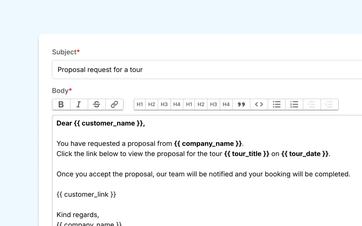
Let the correct information appear automatically in the message
The structure of a confirmation usually remains the same, but the content varies depending on the booking.
The customer's name, the date, the selected tour, the language, and the meeting place change each time.
Eguide retrieves that information from the relevant file and inserts it in the correct place in the message. This means your employee doesn't have to manually copy it from different screens.
This way, a reusable text still becomes a personal and specific message.
Provide practical information without requiring additional research
Information such as the location's address, a description of the meeting place, or a relevant comment can also be included in a message where supported.
As a result, the information continues to come from the same booking that your team is already managing.
If the meeting location changes, you won't have to update several separate sample emails as well. The final message will use the current information from the booking.
See how a single template becomes a personalized email
We create a single message and use it for different bookings.
Make sure every customer receives the same clear explanation
Effective customer communication should not depend on who is managing the inbox that day.
In a template, you can specify in advance how you'll address a customer, what practical information you'll provide, and what next step you expect.
For example, one colleague doesn't forget to mention the meeting place, while another sends a completely different message.
What's more, new employees don't have to spend time sifting through dozens of old emails. The most important messages are already prepared in your organization's style.
Use a recognizable tone
A template doesn't have to sound distant or impersonal.
You write the text yourself, so you can choose how formal, friendly, or practical you want your communication to be. You can use clear subheadings, emphasis, and links to make the message easy to read.
The automatically filled-in information only takes care of the repetitive work. The words and tone remain those of your organization.
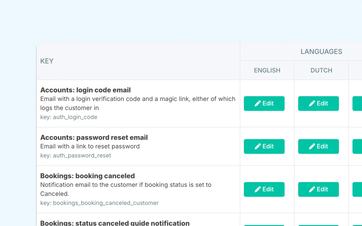
Write each message in the recipient's language
A well-written email in Dutch isn't necessarily a well-written email in French or English.
That's why you can prepare a separate version of the message for each language. You don't have to create a new translation for every booking.
The language preference of the customer or contact person helps determine which version is used. This ensures that communication remains consistent from the initial request through to follow-up.
To learn how languages are used throughout your listings and operations, see the section on managing a single listing in multiple customer languages.
Adjust the content, not just the translation
Different language versions do not have to be rigid, word-for-word translations.
You can, of course, phrase each version in a natural way and take into account the way you usually address your customers in that language.
This way, the message remains relatable to your organization and appealing to the recipient.
Use the correct message from the correct file
A template only becomes valuable when your team can easily use it in their day-to-day work.
From within a booking, the dispatcher can contact the relevant person without first having to open a separate email program and gather all the information again.
Proposals and other supported communication interactions can also have their own prepared text. You can read more about the commercial follow-up to these in the section on proposals that customers can accept or reject.
Find out later what was sent
An email that has been sent doesn't just disappear into the employee's personal inbox.
The supported communication remains associated with the relevant case file. This allows a colleague to check later which message was sent to the customer and when it was sent.
You can find out how that communication, along with shared comments, is tracked in the history of comments and sent messages.
Keep the text and the time of sending separate
An email template determines what you want to say.
Whether the message is sent manually or automatically following a specific event is a separate decision.
This allows you to first ensure that the content of each message is accurate and then determine which messages your team will send on its own and which ones should be scheduled to be sent at a specific time.
Automatic confirmations, reminders, and targeted messages are further developed as part of the process of automating recurring mailings.
Eguide is designed to facilitate communication related to your day-to-day operations. It is not intended to replace a full-fledged system for newsletters, marketing campaigns, or long-term sales processes.
Frequently Asked Questions About Email Templates
Practical answers about reusable communication.
No. You create a standard message for a recurring communication event. The details of the relevant customer and reservation are used to personalize the message.
Depending on the type of message, information such as names, booking details, languages, locations, meeting places, and relevant links may be included.
The available data varies depending on the purpose of the email.
Yes. You can manage the templates by language. The language preference of the customer or contact helps determine which version is used.
Yes. Your organization writes the subject and content of the message itself. You can format the text and add links or other supported content.
No. Some messages are intentionally sent by an employee directly from the relevant file.
Automatic confirmations and reminders constitute a separate communicative function.
No. The email features are designed for operational communication regarding customers, bookings, proposals, guides, and payments.
Eguide is not a comprehensive platform for newsletters, marketing campaigns, or lead nurturing.
Can't find your question here? Please contact us. We'd be happy to take a look at which recurring emails your team is writing over and over again today.