Keep appointments and communications in the correct file
Write down what your team needs to know, share practical information with the relevant guide, and easily find messages that have already been sent.
Don't let important context get lost in a personal email inbox
A customer calls with an additional question. A colleague adjusts the schedule. A guide needs to know that the group is expected at a different entrance.
When such information is contained only in an email, chat conversation, or personal note, it is difficult for someone who takes over the booking later to find it.
In Eguide, add the relevant comment to the reservation it pertains to.
This way, a colleague can immediately see what was discussed earlier, and the customer doesn't have to repeat their story.
The context remains available, even when another employee takes over the follow-up.
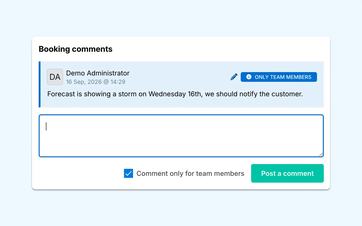
For each comment, choose who should see it
Not every note is intended for everyone.
For example, a colleague within the team might mention that a payment still needs to be verified or that a sensitive customer inquiry requires extra attention. Such information remains within the team.
Other comments are intended specifically for the guide. These might include a change in the meeting place, a practical question, or an update about the group.
For each new comment, you can choose whether it is intended only for your team or whether it will also be shared with the assigned guides.
This way, you won't have to repeat practical information in a separate email, and you'll avoid accidentally forwarding internal context.
Let guides from the same context respond
A guide who sees a shared comment can add a question or update to it.
His response appears again under the same booking. This means Dispatch does not need to import the response from another channel or link it to the correct file afterward.
In the personal workspace for guides, each guide sees only the information that is authorized to be shared with them.
See how the team and guide coordinate based on the same booking
We are following up on a practical change to an internal comment in response to the guide.
See which messages have already been sent
When a customer says they didn't receive a message, you don't want to have to check different mailboxes first.
Communications sent with support remain traceable in connection with the relevant booking, customer, or organization.
You can see who the message was sent to, when it was sent, and whether the delivery was processed correctly.
This allows a colleague to determine more quickly whether a message needs to be resent or whether the email address should be checked first.
Take over a case without starting from scratch
Even in the event of vacation, illness, or a change in personnel, the previous follow-up will remain available.
An employee can see which comments have been added and which messages have already been sent. This allows them to pick up where their predecessor left off.
You can manage the fixed content of recurring messages using email templates that your team can reuse.
Highlight recent comments
A comment is of little value if no one notices that it was added.
Recent booking notes may therefore also appear among your team's operational activity and notifications.
From there, you can immediately open the relevant booking and read the full context.
This way, an important update won't get buried in a file that someone happens to have to open again.
You can read more about this in the overview of reports and recent events.
Use the right place for each type of information
Please include any brief updates or practical questions in the booking notes.
A task that still needs to be completed, a more detailed internal report, or a handover document requires a different approach to follow-up.
To do that, use the tasks, notes, and documents associated with the booking.
This way, the communication remains clear, and a specific action doesn't get lost among ordinary comments.
Keep customer feedback identifiable as individual comments
An internal comment about a customer is not the same as feedback that the customer provides after the tour.
Customer feedback is therefore collected separately and can be viewed across multiple bookings, guides, and tours.
You can read about how to formulate questions and collect answers in the section on collecting and exporting customer feedback.
Use the history for daily monitoring
The comments and messages sent provide your team with a useful overview of what happened regarding a case.
They do not constitute a complete change history in which every old and new value for each posting field is stored.
Eguide helps you get back on track with your daily coordination, but it is not intended to serve as a comprehensive compliance or audit archive.
Frequently Asked Questions About Comments and Communication
Practical answers about shared context.
Yes. For each booking note, you can choose whether it remains internal or is also shared with the assigned guides. This choice is made on a per-note basis.
Yes. The comments show who added them and when. This helps you better understand the context and reach out to the right person if further clarification is needed.
Where communication is tracked, you can view details such as the subject, the recipient, the time it was sent, and the delivery status. This allows you to verify whether a support message was sent from Eguide.
No. The history helps you find supported communication associated with the correct customer, organization, or booking. It is not presented as a complete email inbox for all incoming and outgoing messages.
No. There is no comprehensive audit log that automatically records every change made to every field.
Relevant history will still be available through sources such as comments, communications, guide responses, invoices, and payment records.
Can't find your question here? Please contact us. We'd be happy to take a look at how your team currently keeps track of appointments, questions, and outgoing communications.