Learn from every tour what can be improved
Ask the questions that are important to your business, and invite customers to respond after their tour. All responses will be linked to the corresponding booking, tour, and guide.
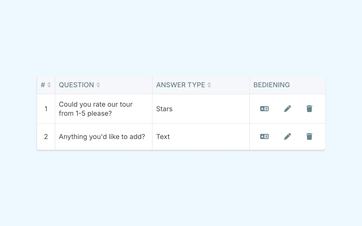
Ask what matters most to your organization
A general review tells you that a customer was satisfied. It doesn't always explain why.
You might want to know how the customer found the guide, whether the tour met their expectations, and whether the practical arrangements were clear.
That's why you decide for yourself which questions you want to ask after a tour.
You can use different types of answers, such as a star rating, and arrange the questions in a logical order.
That way, you're not just collecting feedback, but information that you can actually use to move forward.
Make it easy for customers to leave feedback
Customers are more likely to provide feedback when the questions are clear and relatable.
That’s why you can translate the questions into the languages you use to communicate with customers. A French-speaking customer won’t have to struggle to understand a Dutch-language questionnaire, and an English-speaking visitor will immediately understand what’s being asked.
You don't need to maintain a separate survey in addition to Eguide. The different language versions will remain linked to the same questions.
To learn how to manage your listings and other communications in different languages, see the section on multilingual management in Eguide.
Make a conscious effort to keep the survey short
Asking more questions doesn't automatically lead to better answers.
By choosing for yourself what questions to ask and in what order, you can limit the survey to the topics that are truly important.
This lowers the barrier for the customer and makes it easier for your team to compare the answers later.
See how customer feedback can be useful for your team
We track each response, from the invitation to the feedback summary.
Choose how you'd like to ask for feedback after the tour
Not every organization wants to collect feedback in the same way.
You can invite customers to rate their experience directly through Eguide. The feedback request can then be sent automatically after the booking is completed.
If you prefer to use a public review platform, you can direct customers to your own online review page.
You can also manage the follow-up yourself and decide on a case-by-case basis when to contact someone.
Here's how to choose the approach that best suits your tours, your customers, and the type of feedback you want to collect.
Make a different selection for each booking
Your organization's standard procedure does not have to be mandatory for every booking.
For a sensitive assignment, you might want to contact the client in person first. For another tour, on the other hand, you might want to request feedback automatically.
That's why you can adjust the settings for a specific booking without changing your standard procedure for all other customers.
You can create the text used to invite the customer using the reusable email templates for your customer communications.
Find all the comments in one place
Feedback only becomes valuable when you can use it later.
In the central overview, you can see which customer responded, which booking it concerned, and which guides and tours were involved.
This means you don't have to compile responses from individual emails, online forms, and personal documents.
Even if a customer reports an issue later, the response remains linked to the correct context.
Compare reviews of various guided tours
A single negative review doesn't necessarily indicate a systemic problem. Nor does a single positive review prove that everything always goes smoothly.
By reviewing feedback by tour, guide, or time period, recurring patterns become more apparent.
Perhaps a particular tour often receives the same practical comment. Perhaps some guides are regularly rated for the same quality.
Eguide helps you review those responses together. The evaluation and the final corrective action remain the responsibility of your own team.
Share feedback with the people who need to act on it
Sometimes you may want to discuss a specific comment with the colleague or guide involved. In other cases, you may want to prepare a broader overview for an evaluation or team meeting.
The filtered feedback can therefore be exported for further analysis or internal reporting.
For other data files and administrative exports, please refer to the available operational exports within Eguide.
Keep feedback and internal comments clearly distinct
Feedback is what the customer says about their experience after the tour.
An internal memo about a difficult situation, a practical arrangement, or a question from a guide does not belong in the same overview.
You can save that information in the comments and communication history for the appropriate file.
This way, it remains clear what came from the client and what context was added by your own team.
Specify whether feedback may be shared publicly
When submitting feedback, you can indicate whether the comment may be shared on the website. This ensures that it is clear what permission has been granted before you use a customer comment publicly.
Frequently Asked Questions About Customer Feedback
Practical answers to questions, invitations, and responses.
Yes. Your organization creates the feedback questions itself and determines the order in which they are displayed. You can also use supported response formats, such as a star rating.
Yes. You can add translations for the languages used within your organization. This ensures that customers receive the questions in a language that matches the communication regarding their booking.
When providing feedback via Eguide, the standard automatic invitation can be sent one day after the booking is completed. You can customize the approach for an individual booking.
Yes. You can save your own online review link and include it in the message to the customer. For example, this allows you to direct customers to the review platform your organization already uses.
Yes. The feedback overview can be filtered by guide, tour, and date, among other criteria. Each review also remains linked to the relevant booking and customer.
Yes. The filtered feedback can be exported for further analysis or discussion outside of Eguide. The export does not replace an automated quality report or an independent evaluation of guides and tours.
Can't find your question here? Please contact us. We'd be happy to help you figure out how to request feedback today and what insights you'd like to gain from it.