Take your data with you without having to rebuild everything from scratch
Prepare the information from your daily operations for meetings, accounting, payroll, or further analysis. You’ll start with the data already in Eguide.
Stop doing the same paperwork twice
The information you need is often already available in Eguide.
Your team uses it to manage bookings, customers, organizations, proposals, invoices, guides, and feedback. Yet, separate lists are often created anew for meetings or administrative follow-ups.
Data is copied from various screens, compiled into a new file, and then checked again.
With the export options, you can transfer the existing information directly.
This way, you'll spend less time re-collecting data and more time on the reason you need it.
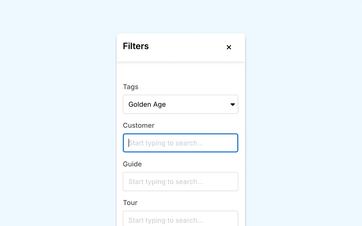
Include only what is relevant to your question
Not every consultation or audit requires the complete set of records.
You might want to view only the bookings from a specific time period. Or just the proposals that haven't been responded to yet. For a colleague, you might only need the clients or organizations within a specific selection.
First, create the relevant overview in Eguide, and then use that information.
This way, you'll end up with a usable file instead of a long list that someone will have to search through again later.
Prepare for a meeting more quickly
For a team or management meeting, you can gather the relevant bookings, proposals, or feedback without having to open each file individually.
The document serves as a practical starting point for further discussion.
If you'd like to view the results directly within Eguide first, use the operational and financial reports.
See which administrative tasks you no longer need to do twice
We'll show you how Eguide prepares data for review, payment, and accounting.
Give your accountant or finance colleague a clear starting point
When someone needs financial information, you don't want to have to explain over and over again which entries and documents go together.
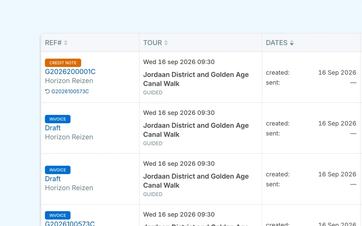
From Eguide, you can export invoice data for further processing or verification.
You can also collect the individual invoice documents if they need to be stored or shared outside of Eguide.
That way, your finance colleague won't have to download all the documents one by one from different files.
Keep the source identifiable
The export retrieves information from Eguide but does not modify the original records.
Your bookings, customers, and invoices will remain available in Eguide as the place where your team monitors day-to-day operations.
The file is intended to be used to work with that information, not to create a second set of records alongside Eguide.
To learn how invoices are initially created and reviewed, see the section on creating invoices and advance payments.
Prepare guide payments based on completed assignments
At the end of a period, you want to know which guides are entitled to which compensation.
Eguide consolidates registered orders, calculated fees, shipping costs, and available payment information.
You can use that information as a starting point for the subsequent payment.
That way, you won't have to go through the trouble of gathering all the guides, assignments, and amounts from different bookings again.
To learn how fees are initially calculated and verified, see the section on calculating guide fees and preparing payments.
Give guides their own overview as well
Guides can view their own earnings for a selected period and use that information for their records.
This gives them a better understanding of the assignments and amounts on which their compensation is based.
Meanwhile, your internal team maintains a consolidated overview of all guides and payments.
Be Better Prepared for Tax Succession
For Belgian guides, in addition to the standard financial tracking, a file can also be created to prepare for Belcotax.
To do this, Eguide uses the data and amounts recorded during its operations.
Your organization is always responsible for verifying which guides are eligible and whether the information is complete and accurate before it is submitted.
This way, tax preparation doesn't start with a blank file, but human oversight is still maintained.
Share feedback without reposting the replies
Collected customer feedback can also be used for an evaluation, team meeting, or further analysis.
You choose which responses you need and take them all with you.
That way, you don't have to copy responses from individual bookings or emails.
To learn how customers are invited and how responses are compiled in Eguide, see the section on collecting and following up on customer feedback.
Keep sensitive information with the right people
Not every employee needs to be able to export financial, personal, or tax information.
You therefore determine which team members have access to the components and actions that fall within their area of responsibility.
This allows someone to track bookings without automatically gaining access to sensitive financial information.
You can read more about this in the section on assigning access within your team.
Frequently Asked Questions About Exports
Practical answers about exporting data from Eguide.
Among other things, you can export data related to bookings, proposals, customers, organizations, guides, invoices, and feedback.
The information available depends on the view you're working in and your access rights.
Yes. For various reports, you can first make the relevant selection.
That way, you don't always have to include all the available data.
Yes. In addition to an overview of invoice details, selected invoice documents are downloaded together.
That way, you don't necessarily have to open and save them one by one.
Yes. For a selected month or period, you can prepare a file containing available bank data and the Amounts billed for completed assignments and no-shows.
Eguide does not process the bank transfers itself. Your organization verifies the information and handles the actual payments.
Yes. For relevant Belgian guides, Eguide can provide a XML file for record 281.50 prepare.
Your organization must verify which guides are eligible and manually review the personal information, amounts, and export details before submission.
No. The exports help to further verify or process information from Eguide.
They do not replace a full-fledged accounting package and do not file financial or tax returns on their own.
Can't find your question here? Please contact us. During a demo, we'll take a look at what information your team is currently compiling manually and how Eguide can simplify that process.