Give people access to what they need—not to everything
Have the dispatch team track bookings and guides, give finance colleagues access to payments and reports, and ensure that important settings are managed by the appropriate personnel.
Let each team member work based on their own responsibilities
Not every employee does the same work.
Dispatch tracks requests, groups, and guides. A finance staff member reviews invoices and payments. A manager oversees the offerings and overall operations.
If everyone has access to everything, Eguide becomes unnecessarily overloaded, and sensitive data or important settings could end up in the wrong hands.
That is why you determine which parts of the process correspond to each responsibility.
This allows an employee to work independently on their own tasks without automatically having access to everything the organization manages in Eguide.
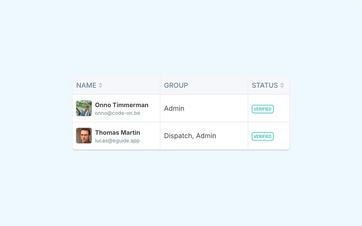
Give the dispatch team room to act quickly
During a busy day, a dispatcher must be able to quickly open a booking, assist a customer, and find a suitable guide.
To do so, that employee does not necessarily need to manage the financial reports, general settings, or the organization's entire configuration.
By tailoring access to daily work, the focus remains on the cases that truly require follow-up.
Employees can act independently when necessary, while sensitive or exceptional decisions remain the responsibility of a supervisor.
Protect financial information without making collaboration difficult
Not every colleague who prepares a booking needs to see guide fees, payment details, or tax reports.
You can restrict access to financial information and transactions to the employees responsible for them.
In the meantime, Dispatch continues to carry out its usual work, including scheduling and customer follow-up.
This means that collaboration does not necessarily mean that all information within the organization becomes visible to everyone.
See how Eguide adapts to your team
During a demo, we map out the responsibilities within your organization to establish clear access rights for each employee.
Combine responsibilities when someone has multiple roles
In smaller organizations, roles often overlap.
The same person can track bookings, review invoices, and manage the product lineup. Therefore, you don't need to pigeonhole them into a single role.
A team member can be assigned multiple responsibilities.
This way, Eguide aligns with how your organization actually operates, even when tasks aren't neatly divided among separate departments.
Create recognizable roles for recurring positions
When several colleagues are doing similar work, you don't want to have to set up their access from scratch every time.
You can therefore create recognizable roles for, for example, dispatch, administration, or management.
New employees are then granted the access rights appropriate for their position.
If the division of tasks changes, you can adjust the role or access rights of the employee in question without having to reorganize the entire operation.
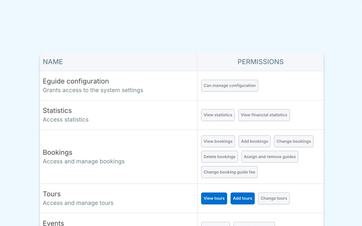
Keep important settings with the appropriate people in charge
Some decisions have consequences for the entire organization.
Consider standard prices, billing information, deadlines, service fees, or how certain features of Eguide are used.
Not every employee needs to be able to change those settings.
You can limit general management to the people responsible for making such decisions. Other team members will continue to work according to the guidelines that have been set for them.
You can find out which organization-wide settings you can manage centrally in the default settings for your organization.
Grant access when someone starts and revoke it when someone leaves
A new colleague can be added to the team and will then be assigned the responsibilities associated with the position.
When someone changes roles, their access can be adjusted.
If an employee leaves the organization, their active access can be revoked without causing the organization's previous files and history to be lost.
This keeps the team overview up to date while still making past work available.
Keep guides out of the internal management environment
A tour guide needs different information than a dispatch or administrative staff member.
That is why a guide works from their own environment with personal requests, schedules, and assignment information.
He is not granted access to the organization's full internal operations simply because he conducts tours for the organization.
You can read more about this on the personal workspace for guides.
Let a guide continue to grow without having to start over
Sometimes a guide is later assigned an internal role, such as planner or coordinator.
In that case, that person can be added as a team member without necessarily having to set up a completely separate account.
Access will be expanded to include the responsibilities associated with the new position.
Show sensitive data only to those who need to see it
Exports may contain information about customers, finances, guide fees, or tax compliance.
That is why such actions should only be available to employees who need them for their work.
For information on how to prepare your data for further processing, see the section on exporting operational and tax information.
During a demo, we can start by discussing your current team: who handles requests, who manages guides, who tracks payments, and who is authorized to adjust general settings?
This way, you can immediately see how Eguide can fit into your existing division of tasks.
In addition to the internal team roles, you can also determine whether guides are allowed to view prices in the Guide Portal.
Frequently Asked Questions About Team Access
Practical answers about roles and employees.
Yes. Your organization can define roles based on the components and actions associated with a particular responsibility.
An employee is then granted access based on the roles assigned to them.
Yes. A single team member can be assigned multiple roles.
That's useful when, for example, someone is responsible for both tracking bookings and performing financial or administrative tasks.
A new employee can be added as a team member.
If the person already exists in Eguide—for example, as a guide—then the existing user can also be assigned an internal role without having to set everything up from scratch.
Yes. General configuration management can be restricted to the employees responsible for it.
Other team members can perform their daily work without access to those organization-wide settings.
The employee's access can be revoked. The organization's existing bookings and other records will remain intact.
No. Guides work from the Guide Portal with the information relevant to their assignments.
Only when someone is also added as an internal team member will that person be granted the additional access associated with that role.
Can't find your question here? Schedule a demo. We'll go over the responsibilities within your team together and show you how that works in Eguide.