Let Eguide work the way your organization works
Set up your standard procedures once. That way, when your team handles new tours, bookings, and invoices, they’ll start with the correct information right away, without having to make the same choices over and over again.
Don't start from scratch with every booking
Every organization has its own standard way of working.
You use standard company information on invoices. You expect guides to respond within a certain time frame. You use a standard payment method and may also charge a fixed service fee.
When employees have to make these decisions all over again with every new booking, it takes time and leads to inconsistencies.
In Eguide, you enter your organization's standard appointments just once.
New tours, events, bookings, and documents are then managed from that central hub. This allows your team to work more efficiently and ensures that day-to-day follow-up remains more consistent.
Use the same company information everywhere
Your organization's name, address, VAT number, and bank account information appear in various places.
Think of invoices, payment information, and other documents for customers and partners.
By storing this data in a central location, your team won't have to re-enter it or copy it from an old document every time.
What's more, you can make a change that applies to future documents by updating it in just one place.
This will help reduce the likelihood of outdated account numbers, different spellings, or incomplete billing information.
Make sure your communication has a recognizable tone
Your logo, contact information, and website details can also be part of your organization's established identity.
As a result, Eguide’s communications are more in line with the name and brand image that customers are already familiar with.
You can manage the content of recurring messages individually using the reusable email templates for your customer communications.
See how Eguide adapts to your operations
During a demo, we'll translate your daily tasks into a clear framework for your team.
Set your regular work arrangements in advance
Many of the same choices come up in almost every application.
How far in advance should a customer book? How long is a quote valid? How long do you expect a guide to take to respond? What language or payment method do you usually use?
You can use such settings as the default.
As a result, when an employee is assigned a new case, they immediately have a useful starting point. They don’t have to know the organization’s procedures by heart or ask a colleague every time.
New team members also get up to speed more quickly, because the standard procedures are already incorporated into Eguide.
Avoid differences among employees
Without a shared foundation, one colleague may keep a proposal open much longer than another. Or similar entries may be prepared with different service fees or payment terms.
Default settings help ensure that customers are treated more consistently.
This allows your team sufficient flexibility to handle an exceptional request differently when necessary.
Leave room for exceptions
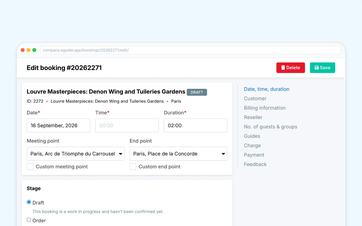
A standard is a starting point, not a restrictive framework.
A special tour may have a different service fee. An event may require different payment arrangements. For a specific customer, you may want to deviate from the standard payment terms.
That is why relevant decisions can still be adjusted later if the specific situation calls for it.
This way, you can combine speed for routine tasks with flexibility for exceptions.
You can find out how to further customize the prices and details of a specific tour in the section on managing your private tours and activities.
Get your invoicing off to the right start
The numbering and standard company information for invoices can also be prepared in advance.
If your team issues an invoice or advance payment later, the document will deviate from the agreed-upon administrative framework.
The timing, amount, and recipient remain the employee’s conscious choice. You can read more about this in the section on verifying invoices and advances.
Share sensitive information only when necessary
Some operational documents or exports may contain personally identifiable information about guides.
Your organization can decide whether such sensitive information may be displayed there.
This way, you can keep documents usable for the people who need to work with them, without automatically including personal information everywhere.
You determine who can modify these organization-wide settings by configuring your team members' access and responsibilities.
Keep track of important connections
If you use online payments or electronic invoicing, you'll want to know whether the required connection is ready for use.
Within Eguide, you can view the relevant status and manage your organization's information.
This means your team doesn't have to guess whether a payment or billing step has already been prepared correctly.
During a demo, we'll review which settings are truly important for your operations. This means you don't need to know all the possible options in advance or draw up a technical configuration plan yourself.
Frequently Asked Questions About Organizational Settings
Practical answers about your standard workflow in Eguide.
Among other things, you can store your organization's permanent company, contact, billing, and bank information.
This information can then be used wherever it is needed within Eguide.
Yes. You can use various standard agreements as a starting point, such as deadlines, payment options, communication preferences, and follow-up on feedback.
This means your team won't have to make these decisions all over again for every new case.
Yes. Where supported, the default selection for a specific tour, event, or booking can be customized.
The standard procedure therefore remains available without making exceptions impossible.
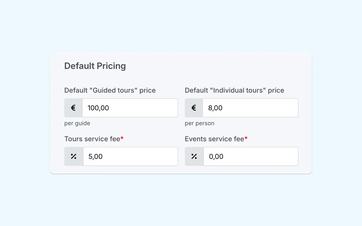
You can set separate standard service fees for tours and events. These can be a fixed amount or a percentage.
For a specific tour or event, you can override the default setting with your own service fee.
Yes. For supported documents and exports, your organization can determine whether certain sensitive identifying information is included.
This way, you'll have more control over where your personal information is visible.
No. During the setup and demo, you can start by considering how your organization operates today.
From there, it becomes clear which options are relevant and which features you don't need.
Can't find your question here? Schedule a demo. Together, we'll take a look at how your organization operates today and show you how Eguide can be tailored to meet your needs.