Always know what has been paid and what is still outstanding
Keep track of all amounts received, regardless of how the customer pays. That way, for each booking, you'll know what has already been received and what still needs to be followed up on.
Keep track of all payments in one place
Some customers pay online right away. Others choose to pay by bank transfer, and for some activities, payment is made on site.
If you track those payments in different places, someone has to figure out over and over again how much was actually received.
In Eguide, the amounts remain associated with the corresponding booking or invoice.
This way, every colleague sees the same payment status, regardless of how the customer paid.
So you don't have to compare the bank account, a cash list, and old emails side by side before you can help a customer.
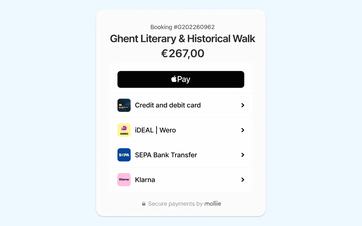
Keep received payments under the same reservation
Online payments made through Mollie are automatically recorded in Eguide. You can also mark payments made by bank transfer or credit card as received in the case file.
A booking can specify “cash at the meeting point” as the agreed-upon payment method, but Eguide does not have a separate category for recording a cash payment received.
Process bank statements via CODA
You can import CODA bank statements. Eguide automatically attempts to link transactions to invoices and provides a review screen where you can check the suggested matches.
See how a payment is matched to the correct reservation
We track each customer from the initial payment through to full payment.
Always keep track of what's still pending
Many bookings are not paid for in a single payment.
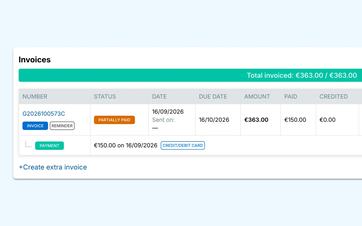
A customer first makes a down payment. The balance is paid later. An organization may pay an invoice in several installments.
Eguide adds up the amounts received and shows how much is still missing.
Your team doesn't have to calculate that remaining balance on its own. Even after multiple payments, it remains clear whether an invoice is still outstanding, has been partially paid, or has been paid in full.
To learn how to create advance invoices and final invoices, see the section on verified invoicing based on your journal entries.
Only follow up with customers who still owe payment
Since the outstanding amount is immediately visible, you don't have to check each customer's status again.
You can more quickly see which payments have been fully processed and which transactions still require financial follow-up.
This allows you to send reminders in a more targeted way and ensures that a customer who has already paid isn't contacted again.
Keep payment and scheduling in the same reservation
A payment is not separate from the rest of your operations.
When a customer calls, you want to be able to see at a glance what they booked, how much has already been paid, and what appointments are still pending.
That's why the payment information remains linked to the same file where you also track the customer, groups, scheduling, and communication.
This way, an employee doesn't have to search through different systems to answer a simple question.
Stay in control of the final confirmation
Just because a customer has paid doesn't automatically mean that every practical detail has already been verified.
With private tours, your team retains control over the final confirmation and scheduling.
When selling tickets, payment can immediately confirm whether the tickets were actually sold. You can read more about this under "Online Ticket Sales and Tracking."
Correct a mistake when necessary
An amount may be entered incorrectly or accidentally linked to the wrong payment.
An authorized employee can correct such a record, after which the paid and outstanding amounts will be correct again.
For situations in which the invoice itself also needs to be corrected—such as a credit memo or a supplementary invoice—proceed to processing financial corrections.
Frequently Asked Questions About Payments
Practical answers about payments received and outstanding amounts.
You can track online payments, bank transfers, and cash payments. This allows you to view different payment methods together for the same transaction or invoice.
No. Online payments made through Mollie are automatically recorded under the correct booking or invoice. You can add bank transfers and cash payments yourself as soon as you receive them.
Yes. You can make multiple payments to the same invoice Register. Eguide adds them up and shows how much is still outstanding.
Yes. You choose the amount you want to charge the customer. The remaining amount can be paid separately at a later time.
Any overpayment will remain visible, so your team will know that further verification is needed. You can then decide for yourself how to handle the overpayment.
No. A financial correction Eguide does not automatically refund money to the customer. You must process an actual online refund separately through your payment provider.
Can't find your question here? Please contact us. We'd be happy to help you track your payments received and outstanding today.