Make corrections without causing confusion later on
Has a price changed, or was a payment recorded incorrectly? Clearly account for the difference, while ensuring that previous invoices and payments remain identifiable.
A retroactive change doesn't have to turn into an administrative headache
A reservation may change after the invoice has already been issued.
The customer adds an additional group. A scheduled service is canceled. A discount was overlooked, or a payment received was entered incorrectly.
Then you don't want to pretend that the original invoice never existed.
In Eguide, you process the change as a subsequent step. The previous document is retained, and the correction clearly shows what was changed afterward.
That way, your team and the client will still be able to understand later how the final amount was calculated.
Pay the additional amount separately
Sometimes a booking becomes more expensive after the first invoice has already been sent.
Perhaps an additional guide will be added, the tour will take longer, or the customer will choose an additional service later on.
In that case, you don't need to replace the first invoice.
You create a new invoice for only the additional amount. This way, the customer can clearly see which portion was billed previously and what the additional amount is for.
To learn how to create the first invoice and any advance payments, see the section on verified invoicing based on your entry.
Reduce the amount of a previous invoice in a way that is clearly identifiable
The opposite can happen, too.
A group is dropped, a component is canceled, or the agreed-upon amount turns out to be lower than what was previously invoiced.
In that case, issue a credit memo for the difference.
The original invoice remains in effect, but the amount the customer actually owes is adjusted accordingly.
This way, it remains clear what was initially charged and which portion was subsequently refunded.
See how to neatly correct a mistake
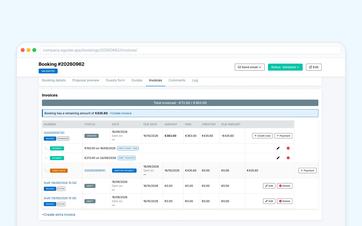
We track a single booking from the original invoice to a clear correction.
Correct a payment that was entered incorrectly
Not every error is on the invoice.
An employee may accidentally record an incorrect amount received or link a transfer to the wrong amount.
You should be able to correct a mistake like that without having to rebuild the entire financial tracking system from scratch.
An authorized employee will correct the incorrect entry. After that, the system will recalculate the amount that was actually paid and the amount still outstanding.
This way, the overview will be correct again for any colleague who opens the booking later.
Notice when a customer has overpaid
Sometimes a customer pays more than the amount still owed.
That surplus remains visible, so that it does not disappear unnoticed into the total amount paid.
Your team will see that further verification is needed and can then decide how to process the amount.
You can find details on the daily tracking of amounts received and outstanding in the combined payment summary for the transaction.
Always keep track of what originally happened
A previous invoice should not be changed without your knowledge when you later update the entry, customer information, or price.
That is why an existing invoice is retained exactly as it was originally created.
The subsequent correction will be placed next to the original document.
That way, a colleague can still see months later:
what was initially billed, why an adjustment was made, and what amount remains after all.
This makes the history easy to understand without anyone having to piece together old emails or scattered calculations.
Find everything under the same reservation
The original invoices, subsequent corrections, and recorded payments are kept together with the file to which they pertain.
From the central dashboard for each booking, your team can therefore see both the practical and financial context.
You don't need to keep a separate adjustment file alongside the journal entry.
Distinguish between an administrative correction and a refund
A credit memo indicates that the customer owes less.
That does not automatically mean that an amount that has already been paid online will actually be refunded to the customer.
If a refund is required, process it separately through your payment provider.
This makes it clear which adjustment was processed administratively and which payment was actually refunded.
Use the history outside of Eguide as well
For accounting, auditing, or further processing, you can retrieve relevant invoice and payment data from Eguide.
For information on how to prepare these files, see the section on exporting operational and tax data.
For a Mollie payment, you initiate the refund in Mollie. Once it has been processed there, Eguide records the refund and the amount paid is reduced accordingly.
Frequently Asked Questions About Financial Corrections
Practical answers for when an amount changes after the fact.
An existing invoice is retained exactly as it was originally created. Any subsequent price changes should be processed using a separate document, so that the history remains clear.
You can create a supplementary invoice for just the additional amount. There is no need to reissue the original invoice.
You can then create a credit memo for the amount to be deducted. The credit memo will remain visible in the same entry alongside the original invoice.
Yes. An authorized employee can correct an incorrectly recorded payment.
Eguide then recalculates how much was paid and what amount is still outstanding.
Any overpayment will remain visible, so your team will know that further verification is needed. You can then decide for yourself how to handle the overpayment.
No. A credit memo adjusts the amount the customer owes, but does not online refund out.
An actual refund must be initiated separately through the payment provider.
Can't find your question here? Please contact us. We'd be happy to review how you currently process price changes, credit memos, and incorrectly recorded payments.