Keep track of every booking from request to completion
Quickly find the right booking and access all related information from a single file. This allows your team to continue working without having to search for customer information, group arrangements, guides, and financial follow-up in different places.
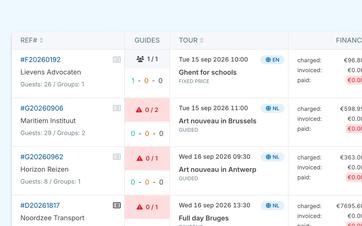
Quickly find the reservation you need
As the number of bookings grows, a simple list is no longer enough. Your team needs to be able to quickly find out which customer has booked, when the tour takes place, and which cases still require attention.
In the booking overview, you can view upcoming and past bookings separately. This keeps the upcoming workload separate from cases that have already been completed.
You can search using identifiable details and filter the list by criteria such as date, customer, tour, guide, language, and payment status. You can also specifically locate bookings with pending tasks or from a specific source.
That way, you don't have to scroll through a long list when a customer calls or a coworker wants to take over a case.
Open all information from the same file
A booking involves more than just a date and a customer name. You also need the group breakdown, locations, guides, pricing arrangements, notes, and financial tracking.
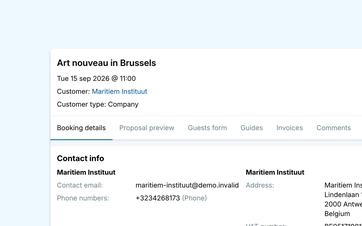
That information is all kept together in the booking file. You can see what the customer requested, how the groups are organized, and which guides are assigned to the tour.
From there, you can also view the related notes, invoices, and payments. This means that an employee doesn't have to open multiple reports first to understand what has already happened and what still needs to be done.
Go directly to related information
References to items such as customers, tours, guides, and invoices open the corresponding file.
This means you can navigate from a booking to the customer details or an invoice and then return to the operational context. The context remains visible without having to copy the same information in multiple places.
The various stages of a booking are tracked separately. This allows you to see whether the booking has already been validated, paid for, and assigned to guides.
See how a single booking brings your entire follow-up process together
Together, we'll go through one complete booking file.
Update the specific reservation when plans change
Even after the application is submitted, many things can still change. The number of participants may change, a group may switch to a different language, or the client may want to start at a different location.
You can edit that information within the booking itself. The tour's default settings will remain in place for future customers.
If the request consists of multiple groups, you can manage the participants, language, locations, and guide requirements separately for each group.
Even after validation or invoicing, an entry can still be modified. Eguide does not automatically rewrite an existing invoice in such cases. If a financial correction is needed, you can process it via a supplementary invoice or credit memo.
Keep operational and financial changes together
When groups, participants, or order lines change, the current financial summary is recalculated.
This allows you to see, within the same file, the applicable amount, what has already been paid, and the outstanding balance. For further processing, you can track both online payments and manually recorded bank transfers from the same transaction.
Proceed directly from the file to take the appropriate action
A booking file is not a static archive. It is the place from which your team handles follow-up tasks.
Depending on the situation, an authorized employee can edit the information, change the status, send an email, or print a booking summary.
Based on the financial data, you can decide for yourself which order lines to invoice and when to send the invoice.
For practical planning purposes, you can open the booking from a daily, weekly, or monthly view of your upcoming activities.
This way, each subsequent step is based on the most up-to-date information in the file, so your team doesn't have to re-enter as much data.
Retain useful historical data without promising a complete audit log
Comments, sent messages, guide responses, and financial records each maintain their own history.
Eguide does not currently include a complete audit log that records every change made to every field. However, the available history does help you locate relevant communications and operational decisions.
Frequently Asked Questions About Managing Bookings
Practical answers about your booking records.
For each booking, the overview shows, among other things, the reference number, customer, tour, date, participants, groups, guides, status, and financial information.
From any row, you can open the entire file for further follow-up.
You can search and filter by date, customer, tour, guide, language, payment status, and pending tasks, among other criteria.
Future and past bookings are also displayed separately, allowing you to assess your current workload more quickly.
The file compiles booking details, group assignments, customer information, guides, notes, invoices, and payments.
Depending on the reservation, there may also be a Suggested view and a form with participant information is available.
Yes. Participants, groups, times, locations, guides, and financial order rules can also be modified after validation.
If an invoice already exists, it will not be automatically updated. A financial difference Process them separately.
Yes. Authorized employees can, among other things, send an email, update the status, edit the reservation, and print a summary directly from the reservation file.
The actions available depend on the user's permissions and the stage of the case.
No. There is no comprehensive audit log that automatically records every change made to every field.
Relevant history will still be available through sources such as comments, communications, guide responses, invoices, and payment records.
Can't find your question here? Please contact us. We'd be happy to help you figure out how your team can track bookings within Eguide.