Keep all bookings together, even if there are multiple groups
Divide a booking into groups, each with its own number of participants, language, and guide. The arrangements with the customer remain a single unit, while your team prepares the details for each group.
Do not create separate files for multiple groups
A company books a single guided tour for several teams. A school divides its students into smaller groups. Or a single group wants to take the same guided tour at the same time in different languages.
In terms of implementation, these are separate groups. For the customer, it remains a single appointment.
If you make a separate booking for each group, you’ll have to enter the same customer information, date, and general arrangements multiple times. If there’s a change, you’ll then have to update each record individually.
Eguide therefore keeps the groups together within a single booking. The customer, tour, and date are recorded once, while you track the differences in how each group’s tour is conducted.
This also makes it clear to colleagues which groups are associated with the same request.
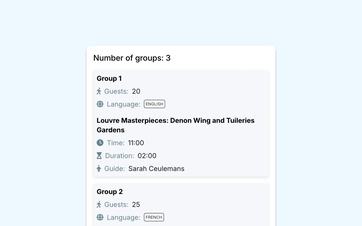
Record the composition for each group
For each group, please indicate the number of participants and the language in which the tour should be conducted.
As a result, a single booking could, for example, consist of a Dutch-speaking group of twenty participants and an English-speaking group of fifteen participants.
Eguide adds up the number of participants from all groups. This means you can see both the breakdown by group and the total number of participants for the entire booking.
The language selection is based on the languages available for your organization and offerings. If you want to manage your offerings in multiple languages, you can configure the language versions for customers and employees centrally.
Let customers specify the layout themselves
When booking online, customers can add multiple groups themselves and specify the number of participants and the preferred language for each group.
The set limits will continue to apply. The selected time slot determines how many groups can book, while the tour itself determines which group and participant limits apply.
This way, your team receives the desired group assignments right when the request is submitted, and there’s no need to collect that information via email afterward.
See how even a complex booking can remain easy to understand
Together, we're putting together a booking that involves multiple groups and languages.
See right away how many guides you need
For a guided private tour, each group requests its own guide.
When you add or remove groups, Eguide automatically adjusts the number of guides needed. Your team can immediately see how many groups still need guidance.
Each group's language then helps in finding a suitable guide. So you don't just start with a date, but also with the tour and the language in which the group would like to be guided.
From the booking page, you can search for guides who match the tour, location, and requested language.
Follow the guide assignments for each group
A guide is assigned to a specific group, not just to the booking as a whole.
As a result, one group may already have a confirmed guide, while you're still waiting for a response from another group.
A rejection for one group does not automatically cancel the entire customer booking. You can resubmit the request for that group or contact another guide.
Adjust the group assignments as the situation changes
Even after the initial request, the number of participants may still change. Perhaps one group will become too large and will need to be split up, or the client may decide to combine two smaller groups.
You can edit the existing booking. You don't need to create new records, and the previous appointments will be retained.
When the groups change, Eguide also updates the total number of participants and the number of guides required. This way, your team can immediately see how the new arrangement will affect the event.
The additional customer, scheduling, and financial context remains available within the same booking file where your team tracks the entire appointment.
Keep the group size within your available capacity
The number of groups a customer can book depends on the capacity you've set for the selected time slot.
For each time slot, you can specify how many groups can book. The allowed group size and participant limits are set during the tour itself.
This allows you to limit the number of concurrent groups without treating each time slot as if it had its own participant limit.
You can set both limits separately for each bookable time slot.
Frequently Asked Questions About Multiple Groups and Languages
Practical answers about your group assignments.
Yes. All groups remain part of the same customer booking.
General customer information, the tour itinerary, and the date are shared, while each group can have its own number of participants, language, and guide.
Yes. Within a single booking, you can Select one or more languages per group. This is subject to the set limit and the languages you have configured as available in Eguide. When searching for a suitable guide, Eguide takes into account the selected language or languages of each group.
For a guided private tour, guides are assigned on a per-group basis.
Based on the number of groups, Eguide shows how many guides the booking requires. Each guide can then be assigned to a group individually.
Yes. When booking online, the customer can Add multiple groups and enter the number of participants and the preferred language for each group.
All groups remain part of the same booking. The limits set for group size, number of groups, and total capacity remain in effect, after which your team can assign a suitable guide to each group.
Yes. An authorized employee can add, remove, or modify groups within an existing reservation.
Eguide then updates the total number of participants and the number of guides required. The customer appointment remains in the same file.
Dispatch sees the refusal and can then Select a different guide and post it. If the entry had already been validated, it remains validated.
Can't find your question here? Please contact us. We'd be happy to help you figure out how to organize larger and multilingual groups within Eguide.