For each group, know who has been invited, who has confirmed, and who needs to be replaced
Send a guide all the details about the tour, language, group, and schedule right away. You'll see when they accept or decline, and if they decline, you can move on to someone else.
Provide the guide with enough information right away
When you ask a guide to lead a tour, they'll want to know right away what it's about.
Which tour is it? When does it take place? In what language? How big is the group? Where does the activity start?
Eguide automatically includes that information from the booking in the request. This means you don't have to write a separate email or re-enter the practical details.
From the overview where you compare suitable guides for the group, choose who you want to contact. That guide will then receive the full assignment.
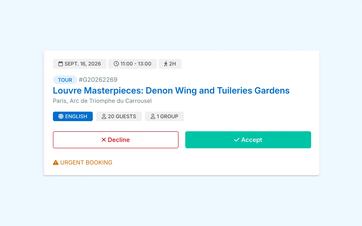
See right away if the guide is available
The guide receives the request via email and in the personal guide portal.
There, he can view the assignment and accept or decline it. The response appears directly in the booking, so dispatch doesn't have to wait for a separate email or phone call.
If the guide accepts, you'll know that the group in question is set. If he refuses, you'll see right away that you need to find someone else.
In the personal workspace for guides, their other assignments and practical information also remain available.
Prevent multiple guides from accepting the same assignment
For each group, request one guide at a time.
This way, you can prevent multiple people from accepting the same assignment and having to disappoint someone later on.
When booking for multiple groups, each group can be entered separately. This means that one group may already have a guide, while you’re still waiting for a response for another.
Don't let unanswered requests remain open indefinitely
Your organization can set a response deadline for guide requests. Eguide can send a reminder and mark a request as "Expired" if it is not answered within the deadline.
After that, you can reach out to another guide specifically without leaving an old request open.
Learn how to request and replace a guide
We follow one group from the initial application to the confirmation of a guide.
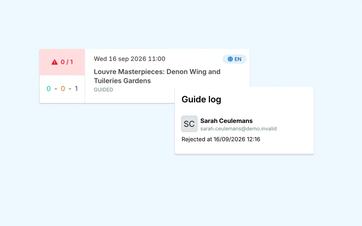
If your request is denied, just move on
A rejection does not mean you have to recreate the booking.
The group, language, date, and practical arrangements will remain the same. You'll go back to the list of available guides and choose a different one.
This way, you won't waste time re-entering information, and the other groups within the reservation will remain unchanged.
The rejection also appears in the notifications feed where dispatch monitors recent responses.
Withdraw an application if your plans change
Sometimes the situation changes before the guide has had a chance to respond.
The customer chooses a different time, a group is canceled, or you decide to reach out to someone else after all. In that case, you withdraw the request, and the guide is notified.
After that, you can continue with another candidate from the same group.
Fill out each group separately
When a booking consists of multiple groups, each group has its own guide.
This allows you to see, for each group, who has already confirmed and where someone is still missing. A cancellation for one group does not affect the other guides or groups.
To learn how to manage groups with different languages and participant counts within a single booking, see the section on working with multiple groups and languages.
Notify guides when important information changes
Even after a guide has accepted, the arrangements may still change.
When relevant information about the assignment is updated, the guide receives a notification. This lets the guide know that they need to review the booking again so they don't continue working with outdated information.
This means your team doesn't have to report such changes again separately by phone or email.
Keep track of what happened earlier
When making a booking, you can see which guides were previously requested and how they responded.
This way, a colleague can understand later why a different guide was chosen or why multiple requests were necessary.
That history helps with day-to-day follow-up, without having to search through old emails again.
Afterward, make it clear whether the assignment was completed
A guide who accepts the request confirms that they are taking on the assignment. Only after the tour is over do you record whether it was actually conducted.
This is done separately, along with any participant attendance. You can read more about this when you register the performance and attendance.
Frequently Asked Questions About Guide Requests
Practical answers about your guide schedule.
The guide displays relevant practical information, such as date, time, tour type, duration, language, group size, and locations. Additional customer, participant, and group information may also be available for the assignment.
When a new application is submitted, the guide receives a email and a report in the Guide Portal.
There, the guide can view the assignment and either accept or decline it. The response will then appear next to the relevant booking for dispatch.
No. Only one guide is approached at a time for each group.
If an application is rejected or withdrawn, dispatch can then select another candidate.
Dispatch sees the refusal and can then Select a different guide and post it. If the entry had already been validated, it remains validated.
Yes. If your plans change, you can withdraw your application.
The guide will be notified, and you can then approach someone else to lead the group.
Yes. When you make a reservation, the previous guide assignment remains available.
That way, you can see later who was asked, who responded, and why a different guide was ultimately chosen.
Can't find your question here? Please contact us. We'd be happy to help you figure out how to organize guide requests within your schedule.