Find out afterward what really happened
Have guides record whether an assignment was completed or whether the customer failed to show up. When participants are identified individually, their attendance for the specific assignment can also be tracked.
Do not close a task until it has actually taken place
A guide has accepted the assignment, and the date has passed. That does not automatically mean that the tour actually took place.
Maybe everything went according to plan. Maybe the customer didn't show up. Or maybe dispatch still needs to check exactly what happened.
That is why Eguide does not finalize an order based solely on the date.
Afterward, the guide or an authorized staff member deliberately records the actual outcome. This ensures that a tentative schedule is not automatically treated as fact.
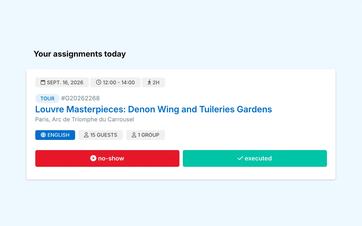
Have the guide record what happened immediately after it happens
On the day of the tour, the guide can see from their personal workspace which tours still need to be completed.
If the group was guided as planned, the guide marks the assignment as completed. If the customer did not show up, this is noted separately.
The actions appear only when the task is current or has been completed. This means that a future tour cannot be accidentally marked as completed in advance.
This takes place within the personal dashboard where the guide also reviews requests, schedules, and practical information.
Keep acceptance and implementation separate
A guide who accepts a request confirms that he is taking on the assignment.
Only after the tour is it recorded whether it was actually conducted. This makes it clear whether an assignment is still scheduled, has been accepted, or has actually taken place.
The previous steps related to requesting, accepting, and, if necessary, replacing a guide will remain available in the history.
See how a guide properly completes an assignment
We track each project from confirmed order to completed execution.
Treat a no-show differently from a cancellation
A cancellation occurs before the tour takes place. A no-show means that the booking remained scheduled, but the customer did not show up at the agreed-upon time.
That distinction is important for the operational history and may also affect the guide's compensation.
For this reason, a no-show is recorded as the result of the guide assignment. The entire booking does not need to be deleted or retroactively marked as canceled in advance.
This way, it remains clear that the guide was scheduled and able to be present, even though the tour was ultimately not conducted.
Close each group individually
If a booking consists of multiple groups and guides, the result may vary by assignment.
One group may have been guided as usual, while another group didn't show up. Because of this, you don't need to assign a single overall rating to the entire booking that wouldn't be accurate for every guide.
Each tour assignment can be tracked separately, while all groups remain part of the same booking.
Record attendance when participants are known individually
For some activities, it is helpful to keep track not only of the number of participants but also of who is present.
The guide can view the names of the participants available for each group and indicate who was present when assigning tasks.
This ensures that the record remains linked to the correct transaction, eliminating the need to reprocess a separate paper list afterward.
The guide can only view the information that is available and relevant to the assignment. More detailed participant data and operational exports are reserved for authorized staff members.
Practical participant information and transfer documents can be prepared in advance using the tasks, notes, and documents associated with the booking.
Correct an error without rebuilding the entry
A guide may make a mistake, or dispatch may receive additional information later.
An authorized employee can therefore correct the recorded transaction retroactively. There is no need to re-enter the customer, groups, schedule, or other booking details to do so.
This allows you to correct the operational reality without pretending that the original entry never existed.
Use the registered version for the next step
After the transaction is closed, the result remains visible in the transaction history and the guide.
It also serves as the basis for calculating guide fees. A completed assignment and a no-show can be handled according to different agreements.
You can read about how contract rules, hours, transportation, and any no-show policies are applied when calculating and exporting guide fees.
So Eguide doesn't calculate the compensation simply because an assignment was once on the calendar. First, it must be determined what actually happened.
Frequently Asked Questions About Implementation and Attendance
Practical answers about closing out assignments.
No. The expiration of the date does not automatically mean the task has been completed. Afterward, the guide or an authorized staff member deliberately records what actually happened.
Yes. For assignments that are current or have ended, the guide can, from the personal workspace indicate that they were carried out.
The promotion is not available in advance for future orders.
In that case, the order can be recorded as a no-show.
That remains a separate transaction result and is not the same as a booking that was canceled in advance.
Yes. An authorized staff member can adjust the result afterward if the guide made a mistake or new information becomes available.
The rest of the reservation remains unchanged.
Yes. When participant names for the assignment are available.
The guide can view the names of each group and check their attendance. More detailed participant information is restricted to authorized staff members.
Yes. Completed assignments and no-shows can be used as a basis for further Calculation of Guide Fees.
The specific compensation depends on the terms of the contract and the compensation agreements in place.
Can't find your question here? Please contact us. We'd be happy to help you figure out how to track your performance and attendance within your organization.