Make sure to include practical details when making the reservation
Add tasks, display relevant alerts at the right time, and generate a booking PDF or manifest for the job. This way, your team won't have to search through separate emails and documents to find practical information.
Keep track of practical follow-up steps when making a reservation
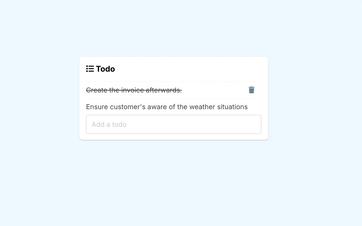
Bookings often involve small but important tasks. A participant list still needs to be checked, access needs to be confirmed, or a practical detail needs to be clarified.
In Eguide, you can add tasks like these as free text to the booking. This way, they remain visible in the same place where you manage clients, groups, dates, and other appointments.
You don't need to open a separate task list to see which booking the action is associated with. You can find this information in the complete booking file.
Find bookings for which a task has not yet been added
In the booking overview, you can filter by whether tasks are present.
This way, your team can find the files for which practical follow-up actions have been noted more quickly, without having to open each future entry individually.
Display a warning when it becomes relevant
Some points to note apply not to a single booking, but to a specific tour, date, or period.
During a tour, you can therefore save an internal note. This note can be temporary or have no expiration date, and can be displayed as information, a warning, or an important point to note.
When an employee selects an appropriate date and time while creating a booking, the relevant note appears. This way, employees don’t have to remember on their own that, for example, there are temporary roadworks or that a usual location is inaccessible on that day.
Use a single note for multiple tours
A note can also apply to multiple tours. You can link a central note to a city, tour type, tag, or your own selection of offerings.
Before saving, you'll see which tours are affected by the rule. When a suitable date and time are selected later, the warning will appear during the booking process.
The cities and tags on which these rules are based come from the reference data that you manage centrally in Eguide.
Keep internal notes and client instructions separate
Not every point of attention is intended for the customer.
Internal notes help employees with planning. Information that the customer does need to receive—such as instructions about the meeting point or preparations—should be saved as customer-facing information associated with the tour or the specific booking.
Those instructions may then appear in proposals or other client documents.
See how practical information is retained when you make a reservation
We track a single booking from internal task to transfer document.
Collect participant information when you need it
Not every tour requires the same information from participants. For a standard city walk, the group size and language may be sufficient, while another activity may require additional details.
When the participant form for the tour is enabled, the form remains available during the booking process. If it is not needed, Eguide clearly indicates that no form is provided for that tour.
That way, you won't have to use a generic form that asks for the same—and possibly unnecessary—information for every activity.
Please post questions and updates as comments
A task describes what still needs to be done. A note, on the other hand, records the question, explanation, or update that employees—and possibly guides—need regarding the booking.
That's why comments are managed separately. You can choose whether a new comment is visible only to the internal team or whether it is also shared with the relevant guides.
You can read more about this in the section on storing internal notes and sent communications with the correct file.
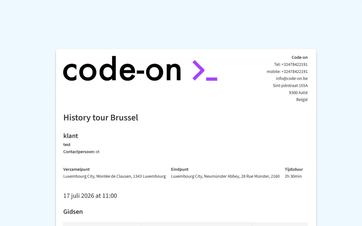
Create a usable PDF booking form for the performance
From a booking, you can generate a PDF containing the relevant booking and practical details for preparation and execution.
That booking PDF is not a participant list. For events, a participant list can be exported separately as an Excel file.
Determine which guide information should be included in the booking PDF
You can use the privacy settings to determine whether sensitive identification information about the guide, such as the guide's ID number, may appear in the booking PDF.
This way, you can share the practical information needed for the event without using the PDF as a general participant or identification document.
After the tour, you can record your performance and attendance.
Frequently Asked Questions About Tasks and Transfer Information
Practical answers about your preparation.
Yes. You can save free-text notes when making a reservation.
In the booking overview, you can then filter by cases to which a task has been added.
A reminder can be set for a specific date, time, or a longer period.
When an employee selects an appropriate tour, date, and time while creating a reservation, the relevant note appears.
Yes. A central note can be linked to, among other things, a city, a tour type, a tag, or a custom selection of tours.
Before saving, you'll see which tours are affected by the rule you've set.
No. Internal memos are intended for operational planning.
Instructions that the customer must receive are stored separately as customer-specific information and may appear in proposals or customer documents.
Yes, when the tour registration form is enabled.
If no form is required, the file clearly indicates that this feature is not active for the selected tour.
The document contains the relevant booking and participant information for the operational transfer.
Whether sensitive identification fields, such as an ID card number, are included depends on your organization's GDPR configuration.
Can't find your question here? Please contact us. We'd be happy to determine what information your team needs to prepare for and carry out the project.