Let the guides themselves indicate when they are usually available
Guides keep their regular working hours, days off, and exceptions up to date themselves. Confirmed assignments appear in their schedule and can be automatically synced with an external calendar.
Start of a typical workweek
Not every guide works at the same pace.
One is available every weekday. Another only gives tours on weekends or combines tour guiding with another job. Some guides also work at different times on the same day.
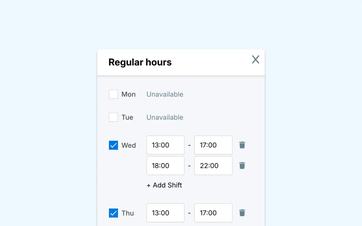
In Eguide, each guide can track their own regular weekly working hours. Each day, they select the times when they are usually available.
A split workday is also possible. For example, a guide can work in the morning and evening but keep the afternoon free.
These hours serve as the default starting point. This means they do not need to be re-entered at the start of each new week.
Adjust only the days that differ from the usual pattern
A standard workweek doesn't tell the whole story.
A guide is on vacation, is available for only a few hours on a particular day, or, in exceptional cases, can work during hours when the facility is normally closed.
In situations like this, he doesn't need to change his entire weekly schedule. He just adjusts the date in question.
A day can be marked as completely unavailable or assigned its own start and end times. Afterward, it can be reset to the regular weekly schedule.
This way, the fixed pattern remains intact, and dispatch still sees the most recent exception.
View exceptions in a broader overview
In the annual view, the guide can see which days follow the regular schedule, which days have different hours, and when he is unavailable.
This makes it easy to see vacation periods and other exceptions without having to open each week individually.
For a more detailed schedule, the guide can go to the weekly view, which shows available hours and confirmed assignments side by side.
See how a guide keeps their schedule up to date
We'll set a standard workweek with a few exceptions.
Compare availability and confirmed orders side by side
Availability indicates when a guide is typically available to work. The calendar shows which assignments he has actually accepted.
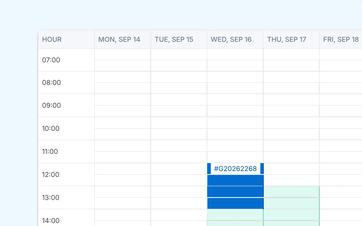
In the weekly view, confirmed tours appear within the time slots in which they take place. This allows the guide to see where tours are already scheduled and which parts of the week still appear to be available.
From an assignment in the calendar, he can proceed to the practical information about the booking.
That personal schedule is part of the guide's personal workspace, where guides can also view requests, notifications, and assignment information.
Use availability when searching for a guide
When Dispatch compares candidates for a group, the specified availability can be taken into account as additional context.
That helps you be less likely to reach out to someone who has indicated they are unavailable at that particular time.
The information is combined with, among other things, the tour, language, and work area within the matching view for a specific group.
Availability remains a factor in this process. Eguide does not automatically exclude an active guide, nor does it independently decide who should be assigned the task.
Import tasks into a calendar you're familiar with
Not every guide wants to check Eguide every day to find out when the next assignment is scheduled.
That's why a future task can be added separately to an external calendar, such as Google Calendar or Outlook.
If you want to automatically include all future assignments, you can use a personal calendar subscription. The active future assignments from Eguide will then be synchronized with your external calendar via an iCal feed.
This way, the guide doesn't have to manually enter new confirmed assignments each time.
Choose between a single task and automatic synchronization
A separate calendar export is useful when the guide wants to add only a specific task.
The calendar subscription is intended for anyone who wants to automatically see all active future tasks in their own calendar.
The personal link is specific to the guide in question and should therefore not be shared with others.
Keep "availability" and "acceptance" separate
A guide who is available based on his work hours has not yet accepted the specific assignment.
Dispatch first selects who it wants to contact. The guide then receives the request and can either accept or decline it.
Conversely, dispatch can still contact a guide even if the registered availability does not fully match. After all, there may be additional information that is not included in the schedule.
A warning about another assignment on the same day also does not automatically block the selection. The team decides for itself whether the two assignments can be combined in practice.
View the broader schedule from the management console
The personal calendar displays the assignments for a single guide.
To view an overview of all bookings, your internal team uses the organization's daily, weekly, and monthly calendars.
Afterward, the guide records separately whether a task was actually completed. You can read more about this in the section on tracking task completion and attendance.
Frequently Asked Questions About Availability and Schedules
Practical answers for tour guides and dispatchers.
Yes. A guide can indicate when they are usually available for each day of the week.
It is also possible to have multiple separate work sessions on the same day.
Yes. For a specific date, the guide may replace the regular schedule with complete unavailability or adjusted hours.
The date can be reset to the regular weekly schedule at a later time.
Yes. The specified working hours and exceptions can be used as context during planning and comparing candidates. They do not automatically determine which guide should be selected.
Yes. Confirmed future assignments appear in the guide's personal schedule. From the calendar, the guide can access the corresponding assignment information.
Yes. A future task can be exported individually to an external calendar. The available shortcuts and processing options depend in part on the calendar app you're using.
Yes. Each guide can use a personal iCal feed to sync active future assignments with an external calendar.
This feed does not contain a complete historical transaction list.
Can't find your question here? Please contact us. We'd be happy to discuss how availability and schedules can be organized within your tour guide operations.