Invoice at the time that best fits the booking
First, request an advance payment; then invoice the balance later, or settle the entire amount at once. You decide what goes on the invoice and review it before it’s sent to the customer.
Choose when you need an invoice
Not every booking follows the same payment schedule.
An individual might pay online right away. A business will likely ask for an official invoice first. For a large group booking, you may want to receive a deposit in advance and invoice the remaining amount later.
That is why Eguide does not automatically generate an invoice as soon as a request is received.
Your team decides when the agreements are clear enough and which document is needed at that point.
This prevents a customer from receiving an invoice before prices, quantities, or practical arrangements have been properly verified.
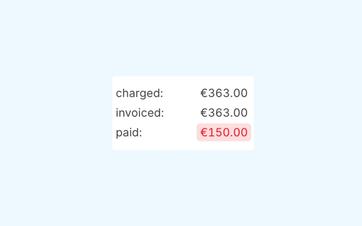
First, request an advance payment, and then the balance later
For larger bookings or those scheduled further in advance, you don't always want to wait until the full amount is paid.
You can therefore first create a separate invoice for the agreed-upon advance payment.
The customer receives a clear invoice for that initial amount. When the balance is due later, create the next invoice based on the same booking.
This way, the advance payment and the balance remain clearly distinguishable from each other, even though they both pertain to the same customer and transaction.
Adjust the invoice to reflect the agreement reached
A deposit does not have to be the same for every customer or reservation.
You decide on a case-by-case basis how much you want to charge first. Even when the customer is allowed to pay online, you choose how much to charge via the payment link.
Further tracking of amounts received and outstanding is done through the joint payment summary for the transaction.
See how your down payment and balance stay easy to track
We track a single booking from the initial deposit to the final settlement.
Invoice only what needs to be paid now
A reservation can consist of several parts.
Consider the tour itself, additional groups, extra services, or other agreed-upon costs. Not everything necessarily needs to be billed at the same time.
When creating the invoice, choose which items you want to include.
For example, you can first invoice an agreed-upon portion and save the rest for later. You don't need to keep a separate spreadsheet or maintain a second set of records to do this.
Keep a single overview when making a reservation
Even when a booking has multiple invoices, they remain visible together.
You can see which documents have already been created and how they relate to the payments that have been received.
This allows a colleague to quickly understand how the entry was structured from a financial perspective, without having to reconstruct all the amounts from scratch.
Check the recipient before sending
For a business booking, the person arranging the tour is not always the one who should receive the invoice.
For example, a teacher might handle the practical arrangements, while the invoice goes to the school’s administrative office. Or a staff member might organize the activity, and the accounting department might process the payment.
Eguide uses the billing information on file for the customer or organization. Before sending the invoice, you can verify that the correct name, address, and contact person are listed.
To learn how to distinguish between practical and financial contacts, see the section on managing organizations with multiple contacts.
Don't send it until everything is correct
An invoice is not sent automatically.
Your team creates the document, reviews it, and then decides when to send it.
This allows you to perform a final check of the amount, the customer information, and the payment arrangement.
Once Peppol has been set up and approved within your organization, it can be used for supported electronic transmissions to business customers. Email remains available for other situations.
Keep previously sent invoices accurate
An invoice is a document that reflects a specific point in time.
If a customer moves later, an organization changes its name, or a booking is modified, an old invoice should not be automatically updated.
That is why an existing invoice retains the information used to create it originally.
New invoices can be generated based on the most recent customer or organization information.
Incorporate subsequent changes into a new document
If an invoice that has already been created needs to be reduced or adjusted retroactively, do not overwrite the original document.
You should account for the difference by issuing a new invoice or credit memo, so that it remains clear what was originally charged and what was subsequently changed.
This is explained in more detail when processing invoice and payment adjustments.
Frequently Asked Questions About Invoices and Advance Payments
Practical answers about invoicing based on a transaction.
No. An employee decides for themselves when an invoice is needed. The invoice is then carefully prepared, reviewed, and sent.
Yes. You can create a separate invoice for the advance payment you agreed upon with the customer. The remaining amount can be settled later via a subsequent invoice.
Yes. For example, a booking may include an advance invoice and a subsequent balance invoice. All documents remain available together under the same booking.
Yes. When creating the invoice, you choose which parts of the booking you want to invoice at that time. Other parts can be included in a subsequent invoice later.
No. Invoices are always sent after a deliberate action by an employee. This allows you to review the invoice and the recipient first.
No. An existing invoice retains the customer, organization, and booking information with which it was originally created.
Changes to that information can, however, be used for documents you create afterward.
Can't find your question here? Please contact us. We'd be happy to review how you currently prepare advance payments, balances, and other invoices.