Keep everyone involved with the same organization on the same page
Save an organization once and assign the appropriate contacts to it. That way, for every booking, you'll know who is following up on the appointments and who should receive the invoice.
Keep an organization running smoothly, even when different people are involved
A school requests a tour through the teacher who will be accompanying the group. The administrative office will provide the billing information later, and another colleague will handle the practical arrangements.
If you store all those people as individual customers, the overall context quickly becomes fragmented. Colleagues then have to figure out for themselves which bookings, invoices, and contacts belong to the same organization.
In Eguide, you create a single organization profile and link multiple contacts to it.
This way, the organization remains recognizable, while you’re still communicating with the right person about the right booking.
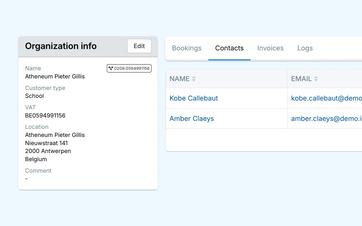
Select the appropriate contact person for each booking
Not every booking made by the same organization is handled by the same person.
A company might make a reservation through HR one time and through a team leader the next. A school might have a different teacher as the point of contact for each class or field trip.
When making a new booking, be sure to select the contact person responsible for that specific request.
The organizational details remain the same, but your team knows exactly who to contact regarding the date, groups, and practical arrangements.
Add new contacts as your collaboration grows
When a new employee joins the team, you add them to the existing organization.
You don't need to create a second organization profile or move old bookings. The new person will simply be available for future requests.
You manage individuals who do not book on behalf of an organization separately through the customer database for individual customers.
See how an organization with multiple contacts can stay organized
We track a single organization from application to invoicing.
Send practical information and invoices to the appropriate person
The person who books the tour is not necessarily the one who processes the invoice.
That's why you can use a separate contact person or email address for billing. In the meantime, day-to-day communication will continue to go through the usual point of contact.
This way, teachers don't have to forward invoices to the accounting department, and the finance department doesn't receive notifications about meeting locations or group assignments.
You can prepare the recurring messages themselves using reusable email templates that include information from the booking and the organization.
Reuse the correct company information
In the organization profile, you can store the information needed for business bookings and invoices, such as the official name, VAT number, and billing address.
The next time you make a booking, you can use that information again. You won't have to copy it from an old invoice or email every time.
Internal data for electronic invoicing can also be stored by the organization if you use that system. This data is intended for your own records and does not constitute a customer portal.
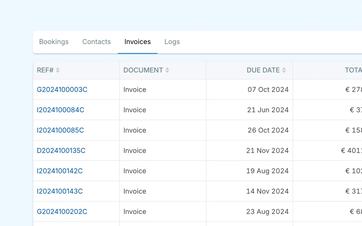
View the entire collaboration within the same organization
From the organization profile, you can see which bookings and invoices are linked to it.
When a contact calls with a question, this helps your team quickly find which activities were previously booked and which invoices are still relevant.
Sent communications are also retained within the organization. This means colleagues don’t have to search through different mailboxes to check what has already been sent.
Keep historical invoices accurate
If an organization's address or VAT number changes at a later date, existing invoices will not be automatically updated.
An old invoice will continue to display the information that was used when it was originally created. New invoices can use the updated organizational information.
This ensures that your financial history remains accurate and that any future changes are not incorrectly applied to past records.
To learn how to create invoices at the right time, see the sections on working with advance payments, balance invoices, and other invoices.
Reuse organizations without cluttering your active file
An organization you are no longer working with on a temporary basis does not need to be completely removed.
You can mark them as inactive so they no longer appear among the regular active options. Previous bookings, invoices, and contacts will still be saved.
If the organization comes back later, you can continue working from the existing history instead of starting over.
Make sure business customers and partners stand out from the crowd
Not every organization is automatically a reseller or booking partner.
A regular business customer makes reservations for their own employees, students, or guests. A reseller sells or books packages on behalf of customers and requires a different type of commercial follow-up.
That is why working with resellers and partner bookings will have its own separate workflow.
Frequently Asked Questions About Organizations and Contact Persons
Practical answers about business customers.
Yes. You can link multiple people to the same organization.
For each booking, select the contact person responsible for that specific request.
Yes. You can use a separate billing contact or billing email address. This allows operational communications to be sent to someone other than the person listed on the invoice.
Among other things, you can store the official organization name, VAT number, contact information, address, and billing information. It also supports internal data for electronic invoicing can be added to the profile.
Yes. From the organization profile, you can view and open the linked bookings. This keeps the history in one place, even when different contacts submitted the requests.
No. An existing invoice retains the customer, organization, and booking information with which it was originally created.
Changes to that information can, however, be used for documents you create afterward.
Yes. An inactive organization is removed from the regular active list, while its previous contacts, bookings, and invoices are retained.
The profile can be reused later when the collaboration resumes.
Can't find your question here? Please contact us. We'd be happy to review how you currently follow up with your business clients and their contacts.