Make every price a clear total
Add required charges and optional extras to your quote. Eguide factors each selection into the subtotal, service fee, discount, sales tax, and final amount.
Include all fixed costs in your price
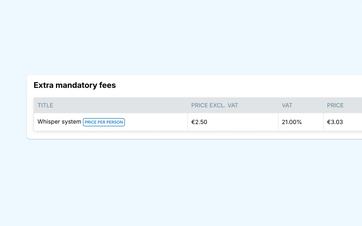
The base price of a guided tour doesn't always tell the whole story. Sometimes, each booking also includes a fixed admission fee, reservation fee, or other mandatory surcharge.
In Eguide, you add these costs to the tour or activity in advance. You decide whether the amount is charged once, per group, or per participant.
If a customer subsequently books two groups or changes the number of participants, Eguide automatically adjusts the calculation. Your team doesn’t have to recalculate the additional costs for each request or manually add them to the total.
The basis for applying these fees is based on the pricing model you selected for the tour or activity.
Make sure the breakdown of the amount is clear
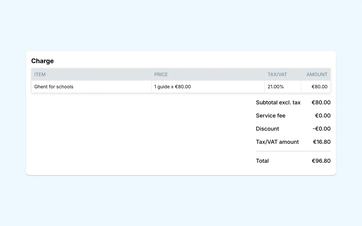
Each cost remains visible as a separate line item. This makes it clear which amount is for the tour itself and which mandatory costs are added on top.
This helps your team explain a price and makes it easier to verify later how the total was calculated.
Let customers choose the extras that suit them best
Not every customer has the same needs. One group wants to add admission tickets, while another opts for transportation, a drink, or an additional activity.
You can include options like these as add-ons in your listing. For each add-on, you can specify how the price is calculated and which VAT rate applies.
Extras that you publish online appear when customers create their own tours and group assignments. Unpublished extras remain available for internal use, such as when an employee processes a request by phone or email.
Show right away how a particular choice affects the total
When a customer adds an extra item or changes the selected quantity, the total is recalculated immediately.
This allows the customer to see, before submitting the request, the total cost of the tour, additional fees, and selected extras. Your team receives the same breakdown with the request and does not need to re-enter the selected options into a separate calculation.
See how Eguide calculates your total cost
We'll work together to determine the price of a single activity.
Set service fees that fit your business model
Service fees are calculated as a percentage in Eguide. You can set a separate standard percentage for tours and events.
If a specific tour or event differs from that standard, you can use a separate percentage for it.
This way, you don't have to set the same preference for every offer, but you still have room for exceptions.
Use the correct VAT rate for each item
Not every component of a booking has to have the same VAT rate. The guided tour, an admission ticket, and any other extras can each be processed at their own rate.
Eguide tracks those rates for each order line and includes them in the calculation. This ensures that the subtotal, sales tax, and total remain consistent with each other when the composition of the transaction changes.
Update a specific reservation when necessary
A preset price covers most requests, but sometimes a customer asks for something that isn't included in the standard tour.
An authorized employee can then add an additional order line to the booking or adjust an existing amount. A discount can also be applied directly to that specific booking.
That change applies only to the file in which it is made. The fixed prices and costs in your offer will remain the same for future customers.
Let Eguide rebuild the entire system
As soon as a price, cost, surcharge, or discount changes, Eguide recalculates the subtotal, service charge, sales tax, and total amount.
This means you don't have to check which interim amounts still need to be adjusted. The updated financial summary then serves as the starting point for further tracking of payments received and outstanding.
When you're ready to invoice, you can create an invoice with the correct order lines from the same entry.
Frequently Asked Questions About Costs and Extras
Practical answers about your total price.
A mandatory fee can be calculated as a single fixed amount, per group, or per participant.
Each expense has its own price and VAT rate and is automatically added to the reservation.
Yes. Extras published for online use will appear during the booking process.
Extras that have not been published remain available internally and can be added to a reservation by a staff member.
Yes. The tour, mandatory fees, and optional extras may each have their own VAT rate. Eguide processes these rates separately and includes them in the total VAT calculation.
You can set separate standard service fees for tours and events. These can be a fixed amount or a percentage.
For a specific tour or event, you can override the default setting with your own service fee.
Yes. An authorized employee can add or modify order lines and apply a discount to a specific booking.
This does not change the standard settings for the tour or activity.
Yes. When a relevant price, cost, surcharge, or discount changes, Eguide recalculates the subtotal, service charges, discount, sales tax, and total amount.
Can't find your question here? Please contact us. We'd be happy to help you figure out how to structure the costs, extras, and totals in your quote.