Make sure every booking is charged the correct price
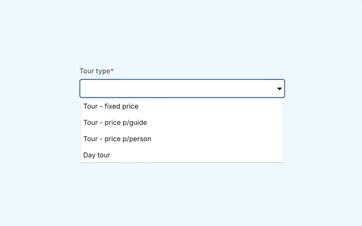
Offer a fixed price, a price per guide, or a price per person. Add multiple pricing options and let pricing rules adjust amounts based on factors such as group size, customer, duration, date, time, reseller, or language.
Choose a calculation that fits your offer
Not every tour is priced the same way. For some activities, you agree on a single price for the entire group. For others, the price depends on the number of guides or participants.
In Eguide, you can choose how the price of a tour or activity is calculated: as a fixed amount, per guide, or per person. A tour can also include multiple pricing options, each with its own name, VAT rate, and pricing rules.
This way, when new requests come in, your team can use a predetermined pricing structure instead of having to recalculate each time.
One price for the entire booking
With a fixed price, you pay a single amount for the tour, regardless of the number of participants or guides, within the agreed limits.
This would work well, for example, for a private tour for which you always charge the same base rate.
A price based on the number of guides
If you charge a fee per guide, the price increases in proportion to the number of guides required for the booking.
If a large order is split among multiple groups, the price will be adjusted accordingly.
A prize for every participant
With a per-person price, the total amount is directly based on the number of participants in the booking.
When the group size changes, the price is recalculated.
Start by determining the correct price for each request
You specify a standard price, but you can also save multiple pricing options for the same tour. Each price can have its own VAT rate and its own set of rules.
With a per-person price, the total amount varies depending on the number of participants. With a per-guide price, the calculation takes into account the number of guides needed to accommodate the group.
Pricing rules then determine which adjustment applies to the specific request. The customer sees the updated amount as they select a date, groups, and any extras.
This ensures that your team applies the same pricing logic to similar requests.
Only edit the specific reservation when necessary
For a special request, you can still adjust the financial terms of the specific booking without changing the fixed prices of the tour.
See which pricing strategy fits your offering
We'll work together to determine the price of an activity from your own offerings.
Let pricing rules automatically apply the correct variant
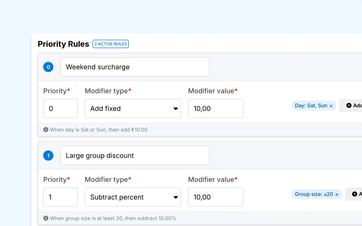
A different price doesn't have to depend solely on the season. Eguide can apply pricing rules based on group size, customer type or category, duration, participant type, date range, day of the week, time of day, reseller, and language.
A rule can completely replace an amount, or it can add or subtract a fixed amount or percentage. When multiple rules apply, their priority determines which logic is applied first.
For example, you can set up a weekend or evening rate, a tiered pricing structure for larger groups, a school or student rate, a seasonal rate, or a reseller rate.
Reuse and Test Pricing Rules
Pricing rules can be set up as reusable templates. You can verify the calculation in a test environment before using the rule in your daily sales operations.
This makes it possible to centrally record more complex pricing agreements without having to recalculate them for every request.
Set appropriate ticket prices for events
Scheduled events work differently from private tours. The customer purchases one or more spots within the event’s available capacity.
In addition to the standard ticket price, you can also use separate rates for children, seniors, and students. These rates apply to events and do not apply to private tours.
When customers order tickets, the total is calculated based on the number of tickets selected for each price tier. The registration and remaining capacity are then linked to the correct event date and the corresponding list of participants.
Keep additional costs separate from your base price
In addition to the selected base price, mandatory fees, optional extras, service charges, VAT, and discounts may also apply.
Those components are managed separately and then consolidated into the total. This makes it clear which portion of the amount comes from the tour or the tickets themselves and which costs are associated with them.
You can read more about this in the sections on setting costs, extras, and the final calculation.
Frequently Asked Questions About Pricing Models
Practical answers about your prices.
You can choose between a flat rate, a rate per guide, or a rate per person.
You use one pricing model per tour or activity. That model determines how the base price is calculated for each new request.
If the price is per person, the total amount will be recalculated based on the new number of participants.
If you use a price per guide, the price is based on the number of guides required for the group assignment. A fixed price does not automatically change due to a change in the number of participants.
Yes. You can set a different price for a specific period.
During that period, the seasonal price replaces the regular base price. Once the period ends, the standard price is used again.
Children's and senior rates are available for Events and Tickets, not for private tours. For an event, the customer can select the appropriate rate when placing an order, and the total is calculated based on the selected tickets.
Yes. Mandatory charges and optional extras are set separately from the base price and may each have their own calculation and VAT rate.
You can set those additional amounts and have them automatically included in the total.
Can't find your question here? Please contact us. We'd be happy to help you determine which pricing model best suits your offering.