Keep the right information about each guide within easy reach
Store contact information, professional context, and relevant history in a single guide profile. This allows every colleague to continue working without having to consult separate lists, documents, or rely on personal knowledge.
Keep your guide database in one place
When information about guides is scattered across spreadsheets, contact lists, and old emails, it's hard to know which information is still up to date.
In Eguide, each guide has their own profile. There, you can store the contact information and professional details your team needs to work with that guide.
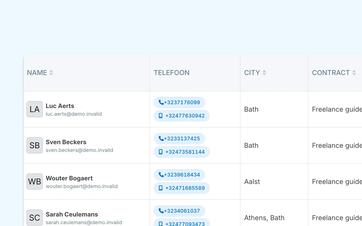
From the central guide overview, you can see, among other things, where a guide is active, which languages and contract context are known, and whether the account is currently active.
So you don't have to compare different files first when you want to contact a guide, provide support, or include them in the planning.
Perform targeted searches within a growing database
As your guide database grows, you can search and filter by data that is relevant to your operations.
For example, you can search for guides based on language, service area, contract type, target audience preference, or previous acceptances. The list can then be exported if you need the data outside of Eguide.
Store professional context alongside contact information
A name and phone number aren't enough to properly schedule a tour guide.
In the guide profile, you can therefore also save relevant professional information, such as areas of expertise, target audience preferences, contract information, and administrative details.
An internal profile description can provide additional context to dispatchers without that text being visible to the guide or the customer.
This ensures that useful knowledge remains available to the team, even when a colleague who knows the guide well personally is not present.
Keep profile information and qualifications separate
The guide profile contains the general information associated with the individual. The specific tours and languages for which a guide can be assigned are managed separately.
For each guide, you can specify which tours, areas of expertise, and languages match their profile.
This distinction keeps the profile clear and makes it obvious that general information and availability for a specific tour are not the same thing.
See how a single guide profile can help your team move forward
Together, we'll go through a complete guide profile.
Preserve the history when the collaboration changes
A guide who is temporarily or permanently no longer being used does not have to be removed from your system.
You can deactivate the profile. The guide will then no longer appear as a regular active candidate, while previous bookings and relevant history will be retained.
If the collaboration resumes at a later time, the existing profile can be reactivated. You won't have to rebuild the data, and you won't lose the previous context.
Invite new guides to explore their own neighborhoods
A new guide can be invited from Eguide to use the personal guide environment.
There, the guide can view assignments and, within supported institutions, manage their own profile and availability information. You can read more about this environment in the section on the personal workspace for assignments, scheduling, and profile management.
If a guide needs help, an authorized employee can access the guide environment to provide support. This capability depends on the user permissions that have been granted.
View previous bookings from the same profile
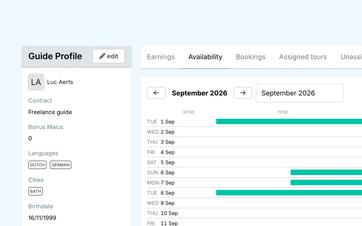
On the guide's profile, you'll also find the bookings the guide was previously assigned to.
You'll see details such as the date, tour, customer, booking status, and guide status. This allows your team to quickly get context about previous assignments without having to look up the bookings individually first.
That history can be helpful when planning for the future, but it is not an automatic selection criterion. The final decision rests with your team.
When comparing candidates for a specific assignment, you can evaluate their profile, language, tour, and availability information together.
Make sure feedback and communication are easy to find
Customer feedback received about a guide remains available in the profile. Sent emails can also be retrieved along with their subject, recipient, status, and send time.
This allows an employee to see what relevant communication has already taken place without having to search a general mailbox again.
This information supports operational follow-up, but does not turn the guide profile into a complete personnel file or HR platform.
Link profile data to the rest of the records
Administrative and financial data from the guide profile can be used later for contracts, reimbursements, and financial exports.
This means you don't have to re-enter that information for every assignment.
The actual compensation is calculated separately. To do so, Eguide uses the terms of the contract and the guide's completed assignments.
In this way, the profile remains the fixed starting point, while each subsequent step retains its own distinct function.
Frequently Asked Questions About Guide Profiles
Practical answers about your guide database.
You can store information such as contact details, address information, areas of expertise, languages, contract context, target audience preferences, and relevant administrative information.
Which data is visible or editable for your team depends on the settings user rights.
Yes. An inactive guide is no longer treated as a regular active candidate, although their profile and previous booking history are retained.
The existing profile can be reactivated later.
Yes. The guide profile includes an overview of past bookings, including the date, tour, customer, booking status, and guide status.
That information provides context, but it does not automatically select the guide for a new assignment.
Yes, for the fields for which your organization allows self-management.
Certain information, such as formal qualifications or authorized work areas, may remain under the control of dispatch.
Yes. Customer Feedback Information about the guide and a log of sent communications can be viewed from the profile.
This ensures that relevant history remains linked to the person to whom it pertains.
No. Eguide supports the operational management of guides, their profiles, history, and administrative context.
It is not a general HR platform for payroll, performance reviews, or comprehensive employee records.
Can't find your question here? Please contact us. We'd be happy to help you determine what guide information your team needs within Eguide.